You can manipulate and analyze your relation map in the following ways:
To suppress branches
 near the Node.
To expand branches
 near the Node.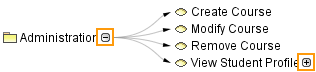
To move the relation map structure
To move the selected Node
To zoom in the relation map structure
Do one of the following:
 on the toolbar.
To zoom out the relation map structure
Do one of the following:
 on the toolbar.
To fit in window
Do one of the following:
 on the toolbar.
To zoom 1:1
 on the toolbar.
To hide an existing element in the diagram
To remove an existing element from the model
To restore the layout of the manually suppressed/expanded branches, moved, removed and hidden symbols
Click  on the View toolbar.
If the Preserve manually suppressed/expanded branches and hidden elements option in the Environment Options dialog > Diagrams > Relation Map, is selected, the layout of moved elements is restored. |
To start the validation of the relation map
 on the toolbar of that diagram, table, matrix, or map. The diagram is validated against all validation rules stored in the model, except those that are ignored.
To select an element in the Containment tree
 on the Navigation toolbar.
To decompose an element
 or press Insert (or
  + I).
+ I).Select element type and relationship. If selected element type exists in the model, select an appropriate element from the list to represent it in the relation map. How to open an existing element list for the unnamed last element >>
The element is decomposed.
To open an existing element list for the unnamed element
To create element of the same type