

Diagram aspects allows you to create the different views, e.g. electrical, mechanical, optical, for the same system structure.The aspects functionality is driven by stereotypes, which allows you to use predefined aspects (only included in SysML Plugin Documentation or other customizations) or custom aspects for diagrams. This enables you to: The figure below demonstrates the usage of predefined diagram aspects. Three SysML Internal Block Diagrams of the same Climate Control Hardware system are of different aspects: electrical and communication. The Internal Block Diagram with the electrical aspect shows only the electrical structure of Climate Control Hardware system. Correspondingly, the IBD with the communication aspect shows only the communication structure. The main workflow to start using the diagrams aspect functionality in your model is the following. To use diagram aspects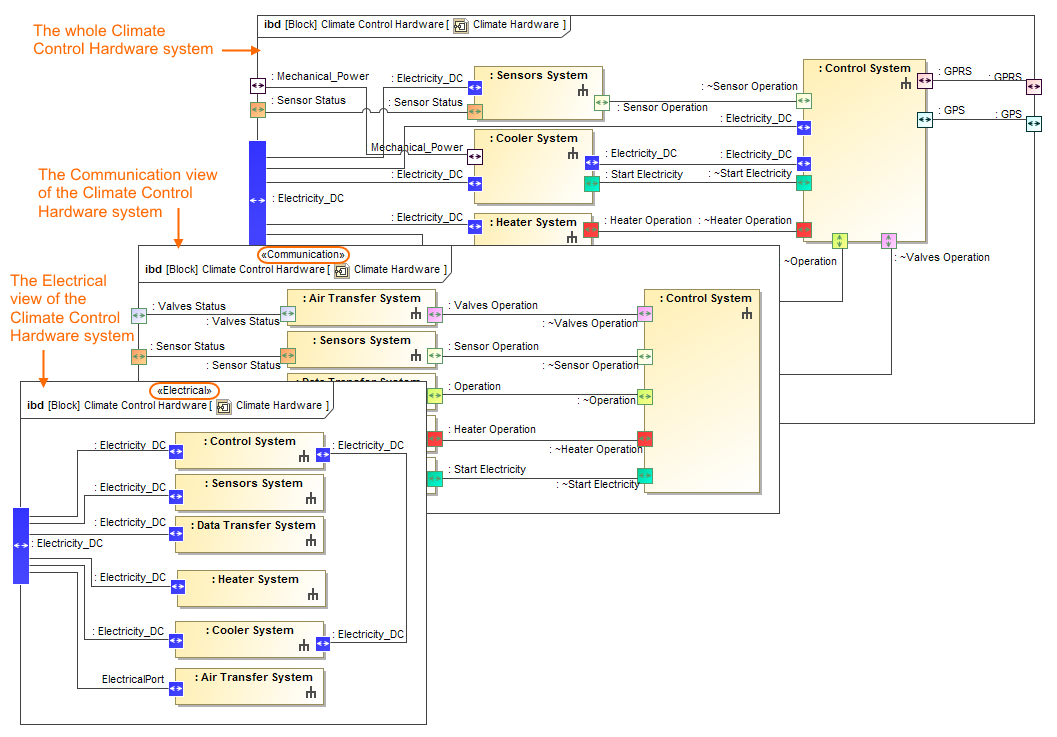 The Climate Control Hardware views through different aspects. The illustration displays concepts from SysML Plugin.
- by creating a new diagram with already applied aspect: Creating an aspect diagram>>
- by applying predefined (#3) or custom aspects (step #4) for an existing diagram. Applying or removing aspect for preexisting diagrams
and Navigation among aspect diagrams.
Child pages
- Enabling or disabling diagram aspects option
- Specifying or removing ignored aspects
- Finding predefined diagram aspects
- Creating custom aspects
- Creating an aspect diagram
- Applying or removing aspect for preexisting diagrams
- How aspects match with parts and ports
- Navigation among aspect diagrams
- Displaying parts and ports according to aspects
Sample model
The model used in the figures of this page is the Diagram aspects sample models that comes with SysML Plugin Documentation. To open this sample properly you need to Installing plugins in earlier versions in the MagicDraw and:
- Download diagram aspects.mdzip.
- Find in the modeling tool: <modeling tool installation directory>\samples\SysML\diagram aspects.mdzip.