

This functionality is available in Standard, Professional, Architect, and Enterprise editions.
The direction of the particular relationship can be reversed. You can reverse the direction of the transition, control flow, object flow, and other relationships.
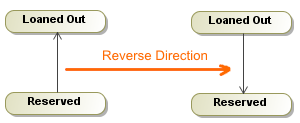
The relation can be reversed if:
- The selected relationship and elements connected by this relationship are editable.
- The source and target elements are compatible, that is, they can be counterchanged.
To reverse a relationship direction
- Select the relationship in the Model Browser or the relationship’s path on the diagram pane.
- From the element’s shortcut menu, select Refactor > Reverse Direction. The direction of the relationship changes.
The direction of the information flow will not be changed on the direction reverse action. Additionally, in some cases when the information flow is not valid anymore, the information flow will be removed from the project after the direction reverse action.
Related pages