

After the ReqIF file import, you can apply an automated post-processing script to your project in order to modify requirements and create custom mapping upon requirements interchange through ReqIF.
In order to see the scripts and execute them, you must be using ReqIF Profile. To set the profile, go to File > Use Project, then scroll to select ReqIF Profile.mdzip and click Finish.
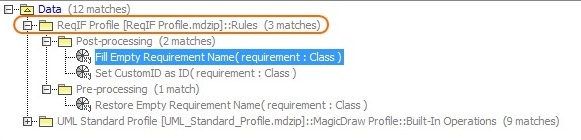
To apply the post-processing rules
- From the Options menu, select Project.
- In the options group list, select General, then scroll down to the ReqIF options group.
- Under the ReqIF Import category, find Post-processing rules and select the one you want to apply.
- Click OK.
| Post-processing Rule | Description |
|---|---|
| Fill Empty Requirement Name | When applied to a requirement with an unspecified Name property, the rule picks the data from Element ID and uses it as the element name. |
| Set CustomID as ID | When applied to a requirement with an empty Element ID, the rule sets the specified CustomID as an element ID. |