SysML Plugin TWRT Documentation


The Zoom tab enables you to preview a selected diagram. To select a diagram, go to the Containment or Diagram tab. You can also use the Zoom tab to zoom in or out of the active diagram.
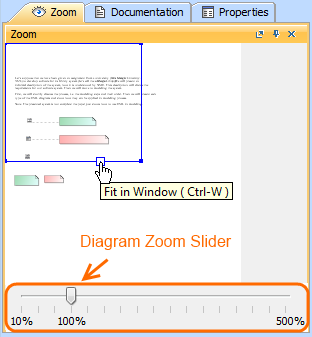
The Zoom tab in the quick properties panel.
To open the Zoom tab, do one of the following
- In the Model Browser, click the Zoom tab.
- On the Window menu, click Zoom.
To zoom in or out of the active diagram
- In the Zoom tab, drag the corners of the blue square.
To quickly access any part of the diagram
- In the Zoom tab, drag the blue square to the desired part of the diagram.
The selected diagram part will be displayed on the diagram pane.
To fit the diagram to the window
- In the Zoom tab, on the blue square
 , click the Fit in Window button or press CTRL+W.
To show the Diagram Zoom Slider
- From the Options menu, select Environment. The Environment Options window opens.
- Select the General options group > Display.
- In the Display category, select the Show Diagram Zoom Slider check box.
The Diagram Zoom Slider is displayed in the Zoom tab (see the figure above).
Overview
Content Tools