SysML Plugin TWRT Documentation


On this page
Purpose
Validation checks the accuracy, completeness, and correctness of a model, marks invalid elements in the model, and suggests solutions.
Validation suites
Models are validated against a set of validation rules. Each validation rule captures an imperative condition that must be checked against the model. Validation rules are grouped into meaningful groups called validation suites. There are predefined validation suites that you can customize. You can also create your own rules and group them into suites. Some validation rules are active; that is, they run all the time. Validation rules and suites can be exported into a separate project in order to reuse them. They are stored in the Teamwork Server or Teamwork Cloud server for exchange.
- Learn more about MagicDraw predefined validation suites >>
- Learn more about SysML validation suites >>
- Learn more about MagicDraw active validation suites >>
- Learn more about SysML active validation suites >>
- Learn more about Requirements validation suites >>
- Learn how to create new validation suites >>
- Learn how to create new validation rule >>
- Learn more about global validation rules >>
Validating your model
The validation can run on the entire model or on a selected part of it. All the elements in that scope are checked against relevant validation rules, and elements that violate these rules are reported in the Validation Results panel. They are also marked in the Model Browser, and their symbols are highlighted. Diagrams, tables, matrices, and relation maps displaying these highlighted symbols have the validation results marker bar.
- Learn how to start the validation >>
- Learn more about validation results marker bar >>
- Learn more about Validation Results panel >>
- Learn more about Validation dialog >>
Invalid elements representation
The invalid elements are marked as follows:
 - error or fatal error.
 - warning.
 - debug or info.
You can see invalid elements in the following areas:
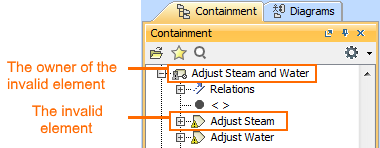
- In the Model Browser an invalid element is marked with a small symbol that depends on the failure severity.
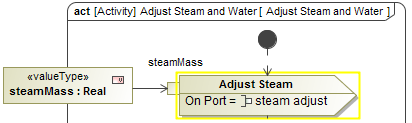
- On the diagram pane an invalid symbol is highlighted.
- In the validation results marker bar every marker of an invalid symbol is colored according to the violation severity.

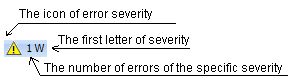
On the status bar the failure indicator displays the severity icon, number of errors, and the first letter of the error severity (F - fatal error; E - error; W - warning; D - debug; I - info).
Solvers of invalid elements
You can analyze invalid elements and solve problems by selecting appropriate commands from the invalid element or symbol shortcut menu or in the Validation Results panel.
Related pages
Overview
Content Tools