SysML Plugin TWRT Documentation


A compartment with a label of initial values is used to show values of properties belonging to a containing block. These values override any default values that may have been previously specified on these properties on their originally defining block. Initial value compartments may be specified within nested properties, which then apply only in the particular usage context defined by the outermost containing block.
The purpose of initial value compartments is to show various values as a result of a reconfigured selected context. Initial value compartments allows to:
- Create different configurations for the same structure and display them directly in the Internal Block Definition diagrams.
- Have different values for the same part in different contexts.
- Assign a different initial value to an inherited property.
The initial values compartment can be shown on Part Property shape compartment and display the values of the properties reconfigured in a selected context.
The procedures below describes how to work with initial values and its compartments:
Defining initial values
You can define context-specific initial values by overriding any default values that was previously specified on Value Properties on their originally defining Block. Before defining a context-specific initial value, the following prerequisites must be met:
- The Value Property must be created for a Block which is a type of Part Property.
- The Type and Default Value are defined for the Value Property in its Specification window.
To define initial value
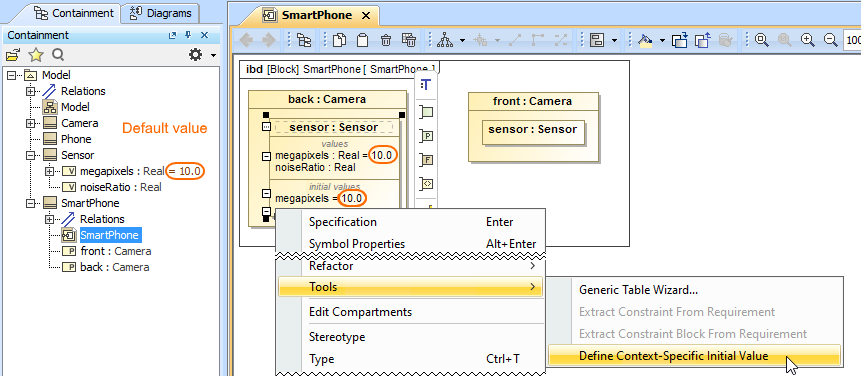
- Right-click the Part Property shape with default value defined.
- From the shortcut menu, select Tools > Define Context-Specific Initial Value.
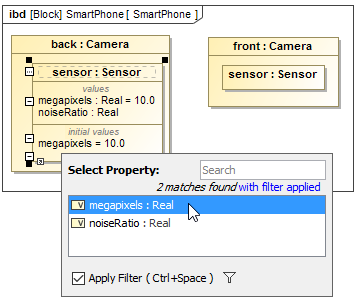
From the Select Property dialog, select Value Property which you want to redefine.
After selecting the Value Property, the structure of instances is created automatically in the Model Browser.
Type the value directly on the Part Property shape.
If you can not specify the new value, check if the context of that Part Property is correct. How to select the context of initial value >
- Press Enter.
The slot with newly defined value is created for the Instance Specification. The default value is not changed.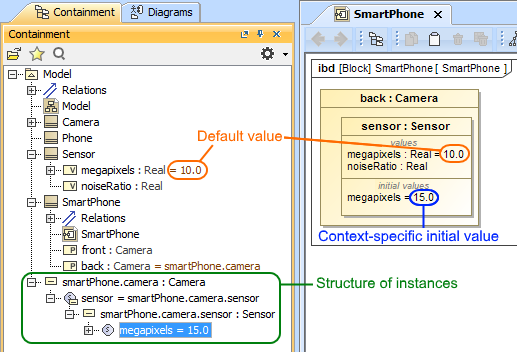
Displaying/hiding initial values compartments
You can display/hide initial values on the Part Property Compartments. Read more about SysML specific compartments.
To show/hide Initial Values on Part Property compartment, do one of the following
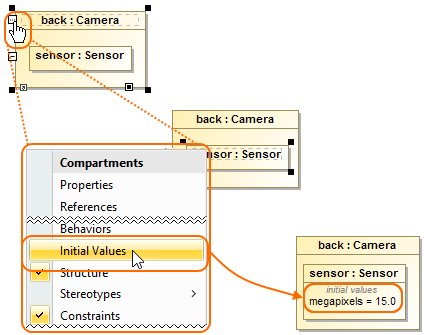
- Select the Part Property shape, click the Compartments smart manipulator, and select Initial Values.
- Right-click the Part Property shape and from the shortcut menu select Symbol Properties. In the Symbol Properties dialog, select the Expert or All mode, and set the Suppress Context Specific Values property value to true to show initial values, or false - to hide them.
Selecting the context of initial values
Initial values which are shown in the Part Property compartments depends from the selected context. For example, if the selected context is A then the compartment show values of A.
To select a context of initial values
- Right-click the Part Property shape and from the shortcut menu select Symbol Properties.
- In the Symbol Properties dialog, select the All mode.
- Select the Context of Context-Specific Values property value box, and click
 .
. - From the Select Element dialog, choose the element which will be the context.
- Click OK.
- Click Close.
The context for initial values is specified.
Displaying/hiding element type in the initial values compartments
You can display or hide the elements types in the initial values compartments of a part using either the Symbol(s) Properties dialog or the part shortcut menu.
To display/hide element type in the initial values compartments
- Right-click the Part Property shape and select the Symbol Properties command.
- In the Symbol Properties dialog, select the Expert or All mode.
- Select the Show Slot Type property value from drop-down list:
- None - to hide types.
- Name - to display names of the element types.
- Qualified Name - to display qualified names of the element types.
Related pages
Sample model
The model used in the figures of this page is the Phone Camera sample model. To open this sample download PhoneCamerasInitialValues.mdzip.
Overview
Content Tools