

You can customize a standard UML property to represent a more restricted type. You can also rename the property.
Property name substitution
The following case study presents an example of property name substitution.
Case study
In the DSL element Specification window, rename the Name property to blockName.
- Create a name attribute in the customization element.
- Apply the «metaProperty» stereotype on the attribute.
- In the «metaProperty» attribute Specification window, click the New Name property, and then type a new name blockName.
- To apply the changes, reopen the project.
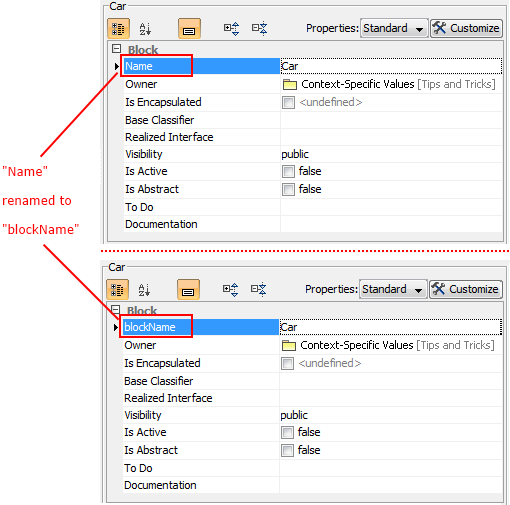
Example of property name substitution.
Property description substitution
In the element Specification window, the description of the selected property is displayed below the properties list (see the preceding figure). You can customize (change) the property description. For example, after changing the property name (see the Case Study above), you could also change the property description.
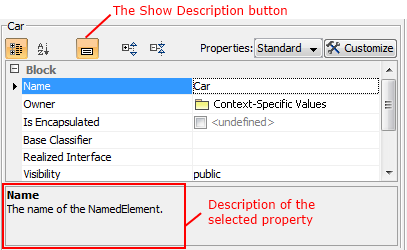
Example of property description area in element Specification window .
Case study
To change the Name property description
- Create a new description attribute in the customization element.
- Apply the «metaProperty» stereotype on the attribute.
- Type a new description in the customization element Specification window, under the description attribute, Documentation/Hyperlinks property group.
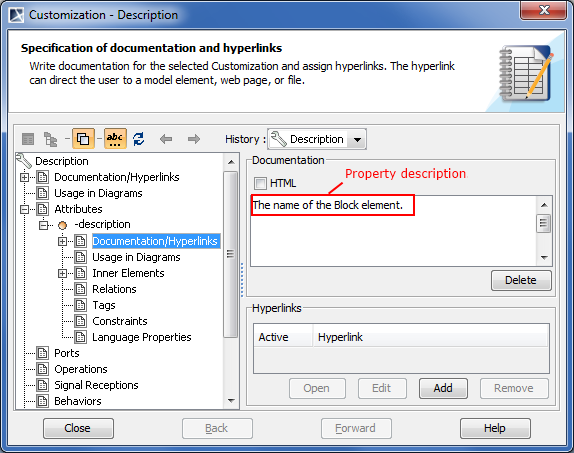
- To apply the changes, save and reopen the project. The description of the Name property changes.
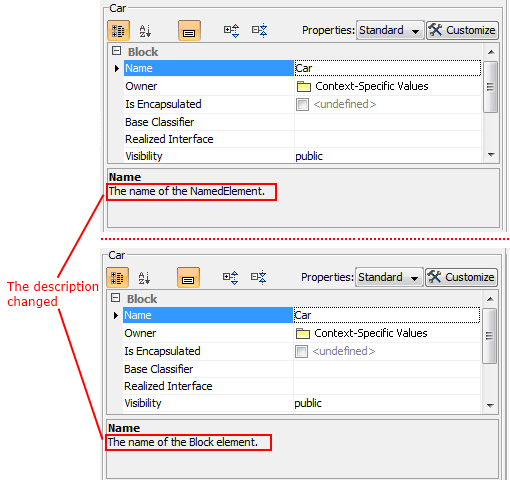
Example of property description substitution.
Type substitution (restriction)
To change the type
- Create the type attribute for the customization element.
- Apply the «metaProperty» stereotype.
- Click the New Types property in the type attribute Specification window.
- Specify the «Block» stereotype.
- To apply the changes, save and reopen the project.
Suggesting predefined values
To create properties to list predefined values suggested for the end user (such as "type modifier")
- Create an attribute for the customization element.
- Name attribute as a property to customize.
- Apply the «metaProperty» stereotype.
- Enter suggested values into the Suggested Values property.