SysML Plugin TWRT Documentation


You can display implied relations between Part Properties, ports, diagram frames which are connected through ports/interfaces.
To display implied relations
Select the Part Property shape, diagram pane, or diagram frame you want to display implied relations.
Do one of the following:
- Right-click to open the shortcut menu, and select Display > Display Implied Relations.
- On the diagram toolbar, click
 and select Display Implied Relations.
 - Press Ctrl+Alt+V.
The implied relations are displayed between Part Properties, ports, and/or diagram frame. By default, the implied relation is represented as a dashed line with a short summary in label of how many actual connectors are underneath. You can specify a different style of the implied relation by using its the Symbol Properties dialog. The Label Display Mode property is described separately in the Changing the label display mode page.
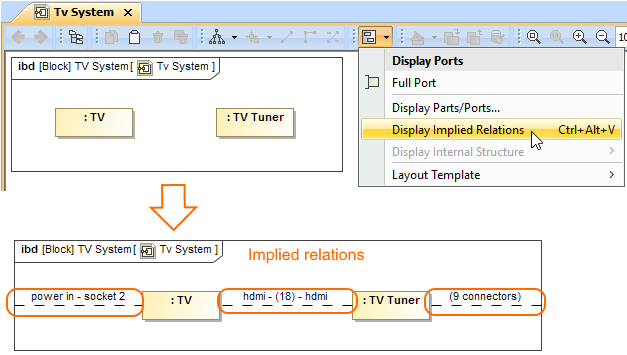
Three implied relations displayed between Part Properties typed by TV and TV Tuner Blocks and diagram frame by using the Display button from the diagram toolbar.
Sample model
The sample model used in the figures on this page is the Implied Connectors sample model. Download Implied Connectors.mdzip.
Overview
Content Tools