SysML Plugin TWRT Documentation


On this page
Introduction
An Interface Control Document (ICD) table describes interfaces between systems or/and subsystems. That helps to ensure a compatibility between system components. The ICD tables can describe the following:
- The inputs and outputs of a single system.
- The interface between two systems or subsystems.
- The complete interface protocol from the lowest physical elements (e.g., the mating plugs, the electrical signal voltage levels) to the highest logical levels (e.g., the level 7 application layer of the OSI model), or some subset thereof.
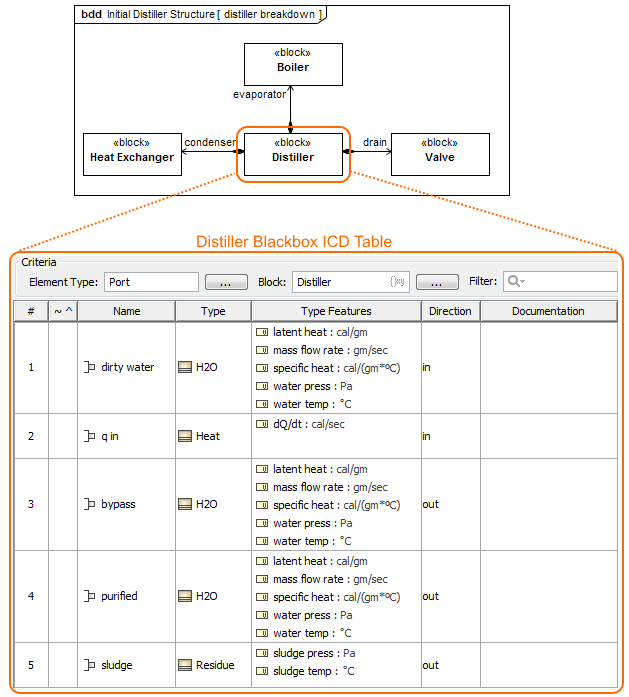
The Blackbox ICD table of the Distiller Block.
The views for system components interface are generated automatically from the system model. This provides up to date, efficiently managed, and fully featured model-based ICDs. The true model-based document-free approach is supported, along with all the capabilities of table export to document (images, html, .xls, .csv files). You can create the Balckbox ICD table and/or Whitebox ICD table directly from the SysML Block Definition Diagram and SysML Internal Block Diagram.
Creating Blackbox ICD Table
To create a Blackbox ICD Table
- In the Containment tree or on the diagram pane, select the Block which ports/ interfaces you want to represent in the Blackbox ICD Table.
- Do one of the following:
- From the main menu, select Diagrams > Create Diagram. Type “bla” and press Enter.
- On the main toolbar, click the Create Diagram button. Type “bla” and press Enter.
- Press Ctrl+N. Type “bla” and press Enter.
- Right-click the Block and select Create Diagram > Blackbox ICD Table.
- Open the Specification window of the Block, select the Ports/Interfaces property group and click the Create ICD Table button.
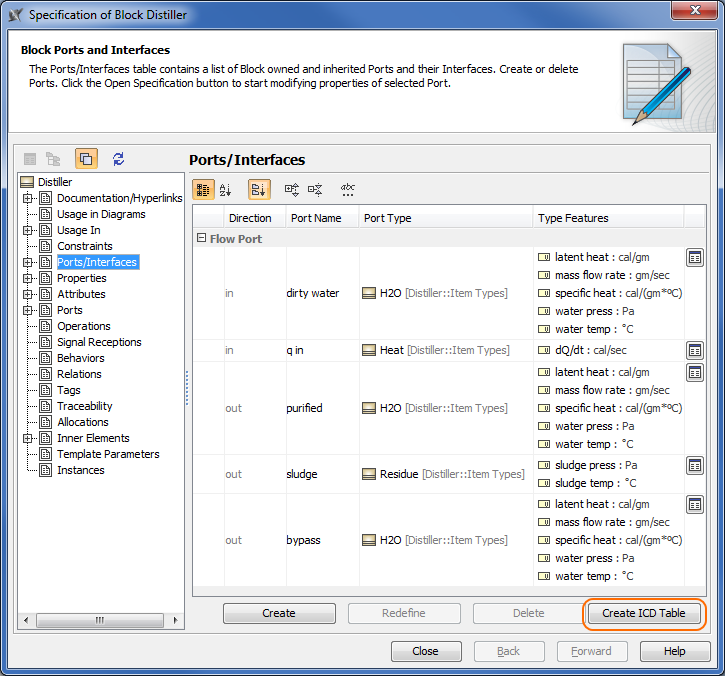
The Blackbox ICD Table is created. All external Ports/interfaces of the selected Block are represented in the table automatically. Learn more about Blackbox ICD Table >>
Type a table name and press Enter.
Creating Whitebox ICD Table
To create a Whitebox ICD Table
- In the Containment tree or on the diagram pane, select the Block which assembly you want to represent in the Whitebox ICD Table.
- Do one of the following:
- From the main menu, select Diagrams > Create Diagram. Type “wh” and press Enter.
- On the main toolbar, click the Create Diagram button. Type “wh” and press Enter.
- Press Ctrl+N. Type “wh” and press Enter.
Right-click the Block and select Create Diagram > Whitebox ICD Table.
The Whitebox ICD Table is created. All Parts, their Ports/interfaces and flows are represented in the table automatically. Learn more about Whitebox ICD Table >>
Type a table name and press Enter.
Customizing the representation of the ICD table
You can customize the representation of the ICD table by using the table toolbar and table Criteria area.
Overview
Content Tools