

Description
The Strategic Constraints (St-Ct) details the measurements that set performance requirements constraining capabilities.
Implementation
The Strategic Constraints (St-Ct) view is represented by:
- Strategic Constraints Definition diagram based on a UML Class diagram.
- Strategic Constraints table.
Sample
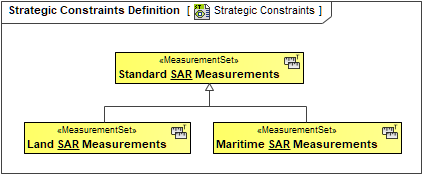
An example of a Strategic Constraint Definition diagram.
Constraint owner
You can choose where all the constraints will be stored through the Project Options.
To select a constraint owner
- In the main menu, click Options > Project. The Project Options dialog opens.
- Go to General > UAF, and in the Default Constraint Owners property group, choose a needed owner.