SysML Plugin TWRT Documentation


On this page
Introduction
You can validate your models against a set of SysML constraints called validation suites. You can use the SysML validation suite that comes with the SysML Plugin to validate SysML projects. You need to perform the validation manually to check your model against the predefined validation suites. The predefined validation suites have «validationSuite» stereotype applied.
Each Profile contains its own validation suites. You can create your own validation suites.
You can meet the following SysML validation suites in the Validation dialog or Validation Suites dialog:
- SysML ValSuite - Activities contains SysML constraints on the following elements: Control Operator, Control Value, Discrete, noBuffer, Optional, Probability and Rate.
- SysML ValSuite - Blocks contains SysML constraints on the following elements: Binding Connector, Block, Distributed Property, Part Property, Reference Property, Shared Property, Value Property and Value Type.
- SysML ValSuite - Constraint Blocks contains SysML constraints on the following elements: Constraint Block and Constraint Property.
- SysML ValSuite - Model Elements contains SysML constraints on the following elements: View and Viewpoint.
- SysML ValSuite - Non-normative Extensions contains SysML constraints on the following elements: nonStreaming, Streaming, Design Constraint, Functional Requirement, Interface Requirement and Performance Requirement.
- SysML ValSuite - Port and Flows contains SysML constraints on the following elements: Flow Port, Flow Property, Flow Specification and Item Flow.
- SysML ValSuite - Requirements contains SysML constraints on the following elements: Copy, DeriveReqt, Requirement and Test Case
You can find predefined validation suites in the Containment tree when the Show Auxiliary Resources option is enabled, expand the MD Customization for SysML Package > SysML constraints Package > SysML ValSuite Package. The SysML ValSuite Package is divided into separate Packages and contain an appropriate validation rules.
To show the auxiliary resources
- In the Model Browser, click
 and enable the Show Auxiliary Resources option.
Learn how to start the validation >>
Limiting the scope of the constraints to be validated against
If you select the SysML ValSuite as the Validation Suite in the Validation dialog, your model is validated against all SysML validation suites at the same time. To limit the scope of the constraints to be validated against, select a more specific validation suite, such as SysML ValSuite - Blocks. The model or its part is validated against the selected validation suite. The Validation Results panel shows the results, listing all elements that do not conform to some constraints in the selected validation suite. These elements are called “invalid” elements and are highlighted.
Customizing validation options
You can customize the Validation options in the Project Options dialog.
To open the Validation options
- Open the Project Options dialog in one of the following ways:
- On the main menu, select Analyze > Validation > Validation Options.
- On the main menu, select Options > Project. In the Project Options dialog, select General > Validation.
- Specify the options you need in the Validation area. How to use the Project Options dialog >>
- Click OK.
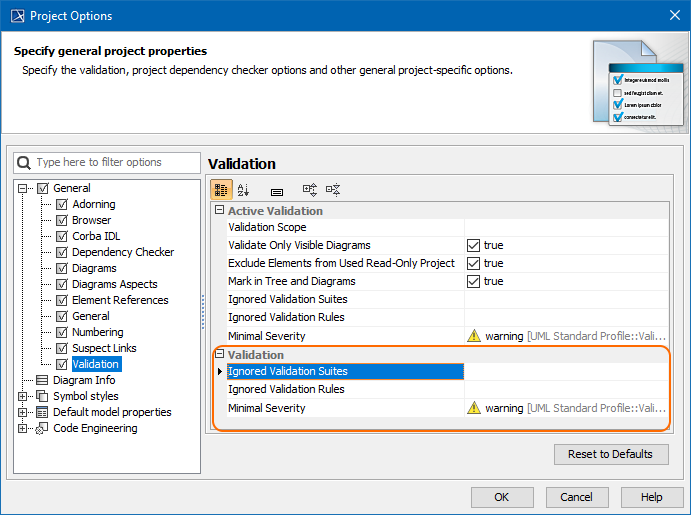
Validation options in the Project Options dialog.
Related pages
Overview
Content Tools