

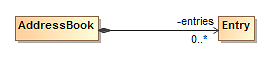
The Address Book model consists of an AddressBook class associated with an Entry class. We will create these classes on a Class diagram.
To create the Address Book class diagram
- Create a new Alf project as described in Alf project template, using the name Address Book for the project.
- In the new project, click the Create Diagram button on the toolbar and select Class Diagram. Name the diagram Address Book.
Use the Class Diagram toolbar to create a new Class named AddressBook.
For simplicity in later code, we are using camel case for the class name here, with no space between "Address" and "Book".
- Create a another new Class named Entry.
- Click on the
next to Composition on the Class Diagram toolbar and select Directed Composition.
- Draw an Association from AddressBook to Entry on the Class diagram.
- Right click on the Entry end of the Association and select Edit Name.
Type entries for the Association end name.
Right click on the entries Association end and select the multiplicity 0..*.
Related pages