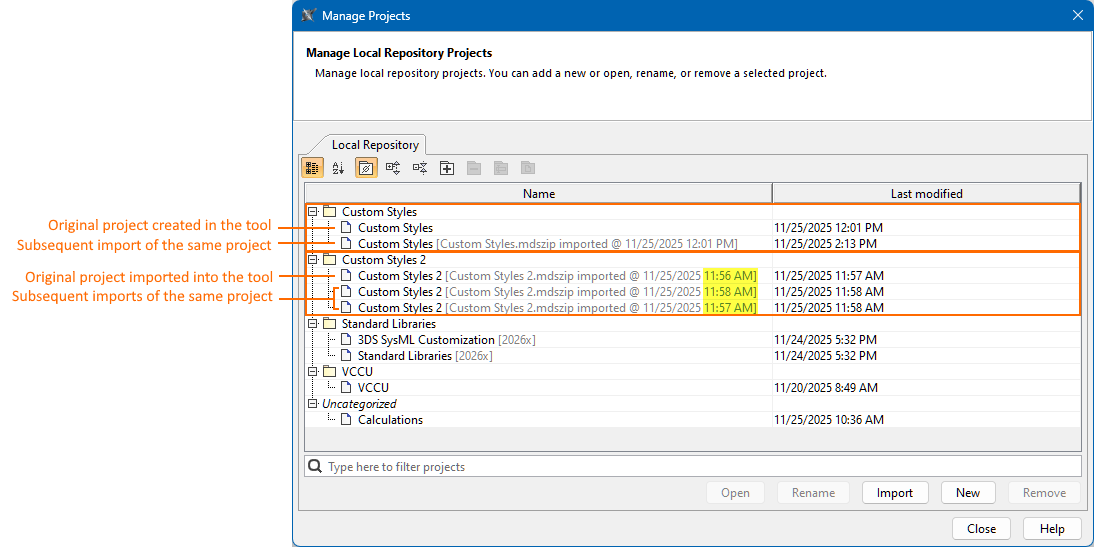
Each originally created or imported project in the local repository may have multiple subsequent imports of the same project. For example, you might export a project from the local repository, share it with a colleague who makes changes while you continue working on the original, and then later import your colleague’s modified copy back into your local repository. In this case, the local repository will display both projects: the original and the subsequent import of the same project. You can modify both projects independently, and although they are displayed as separate projects, they are treated as distinct but still interdependent instances of the same project.
- The original project is the first instance of the project that exists in the local repository, which can be created in or imported into the local repository.
- If the original project was created in the local repository, it is displayed only by indicating the project name.
- If the original project was imported into the local repository, it is displayed using the following structure: [<file_name>.mdszip imported @<date and time of the import>].
- Subsequent imports of the same project are any later instances of the project that are imported into the local repository.
- Subsequent imports of the same project originate only by importing a project into the local repository. They are displayed using the following structure: [<file_name>.mdszip imported @<date and time of the import>].
- Renaming the original project in the local repository renames all of its subsequent imports, and vice versa.
- Removing the original project from the local repository removes all subsequent imports of the same project. Removing any subsequent import of the same project does not affect the original project.
- Moving the original project to another project category in the local repository moves all of its subsequent imports, and vice versa.
You can view the project details in the Manage Projects dialog.