Compartments
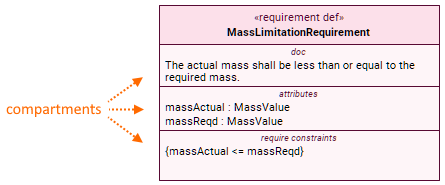
A compartment view usage is an area on the element symbol that displays specific element data. You can also use compartments to create new owned elements for the selected element. Any usage or definition element may have compartments listing their owned and inherited elements. The element symbol compartments are a graphical display of the element body in the textual notation.
requirement def MassLimitationRequirement {
doc /* The actual mass shall be less than or equal to the required mass. */
attribute massActual : MassValue;
attribute massReqd : MassValue;
require constraint {
massActual <= massReqd
}
}
On the left: the requirement symbol with documentation, attributes, and require constraints compartments.
On the right: the same requirement with its owned elements declared in the body.
Displaying and suppressing compartments
Many symbols have various compartments available to them which are hidden by default. Follow the the options listed below to check it if the needed compartment is not displayed.
To display or suppress compartments, do one of the following
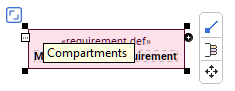
In the view, click the symbol, then click the Compartments button. Select or deselect the particular compartment.
- In the view, right-click the symbol and in its shortcut menu, click Symbol Style. Then enable or disable the Show Compartment property for the needed compartment in the Symbol Style dialog.
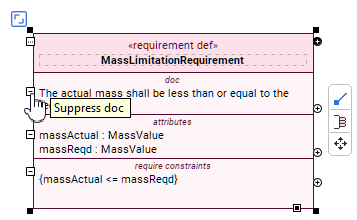
- In the view, select a symbol and click the Suppress <compartment name> button.
Displaying or hiding elements in compartments
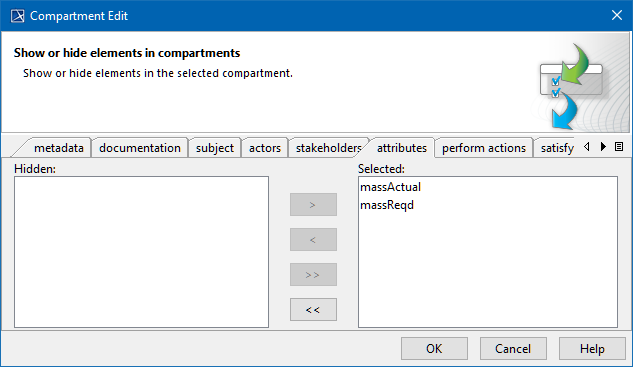
Use the Compartment Edit dialog to control the list of elements and properties visible in symbol compartments.
To open the Compartment Edit dialog
- Select a symbol and click the Compartments button. In the submenu, click the arrow to expand and then click Edit Compartments.
Creating elements via compartments
You can use compartments to create new owned elements for the selected element.
To create an element via the symbol compartment in a view
- Do one of the following:
- Select an element symbol and click the Create Element button on it. In the dropdown menu, select the element you want to create. The new element is created and displayed in its appropriate compartment.

- Select an element symbol and on the right side of the compartment of the element kind you want to create, click the Create <element kind> button. The new element is created and displayed in its appropriate compartment.
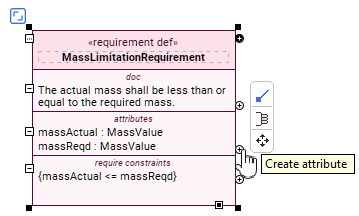
- Select an element symbol and click the Create Element button on it. In the dropdown menu, select the element you want to create. The new element is created and displayed in its appropriate compartment.
Compartments table
The table below lists the compartments available to specific element symbols based on their element metaclass.
| Compartment | Element metaclass | Compartment | Element metaclass | |
|---|---|---|---|---|
| metadata | All namespaces | perfom actions | Definitions, excluding: Usages, excluding: | |
| doc | Package | subject | CaseUsage CaseDefinition RequirementUsage RequirementDefinition | |
| actors | CaseUsage CaseDefinition RequirementUsage RequirementDefinition | stakeholders | RequirementUsage RequirementDefinition | |
| objective | CaseUsage CaseDefinition | include use cases | Definitions, excluding: Usages, excluding: | |
| parameters | ConstraintUsage |
| frames | RequirementUsage |
| satisfy requirements | Definitions, excluding: Usages, excluding: | exhibit states | Definitions, excluding: Usages, excluding: | |
| require constraints | RequirementUsage RequirementDefinition | attributes | Definitions, excluding: Usages, excluding: | |
| assume constraints | RequirementUsage RequirementDefinition | items | Definitions, excluding: Usages | |
| assert constraints | PartUsage PartDefinition RequirementUsage RequirementDefinition | enums | EnumerationDefinition | |
| constraints | CaseUsage CaseDefinition RequirementUsage RequirementDefinition | actions | Definitions, excluding: Usages, excluding: | |
| parts | Definitions, excluding: Usages, excluding: | ends | ConnectorAsUsage | |
| ports | PartUsage | members | Package | |
| while condition | WhileActionUsage | features (name not displayed in compartment) | MetadataUsage | |
| until condition | WhileActionUsage | rules | Part usage or definition specializing Policies::StyleSheet | |
| for iterator | ForLoopActionUsage | |||
| if condition | IfActionUsage | |||