Custom style sheets
Instead of or in addition to using the default style sheet that specifies the default symbol styles, you can create your own custom model-based symbol styles by creating style sheets with your own sets of rules.
Working with style sheets
Custom model-based symbol styles are specified in a style sheet. There can be several types of style sheets:
- Predefined style sheets. The predefined style sheets are located in the DS_Styles::StyleSheets package of the 3DS SysML Customization library. There are two predefined style sheets in the DS_Styles::StyleSheets package:
- DefaultStyleSheet
- BlackAndWhiteStyleSheet
- User-created style sheets. There are two types of style sheets you can create:
- Reuse an existing style sheet
This option allows you to create your own custom rules as well as reuse and customize all the rules already available in the reused style sheet. The reused style sheet can be either a predefined one (e.g., DefaultStyleSheet) or a custom-created one. For example, you can reuse the DefaultStyleSheet style sheet, then customize its rules by changing their names, attributes, and their values, etc. Additionally, if you create rules only for selected symbols, overwriting the DefaultStyleSheet's rules, all the other symbols you do not overwrite will continue to be represented according to the DefaultStyleSheet. - Create a custom style sheet from scratch
This option allows you to create your own custom rules only without reusing any predefined or custom style sheets and their rules. Choose this option if you prefer creating your own rules without the need to reuse or customize the existing ones.
- Reuse an existing style sheet
Style sheet composition
A style sheet is comprised of the following components:
- Rules - specify conditions and styles for symbols.
- Condition - specifies to which symbols the rule applies.
- Style - specifies the style that will be applied to the symbols that comply with the specified condition.
part attributeRule :> rule {
part :>> condition : ByElementMetaclassCondition { // the 'condition' component specifying a predefined condition ByElementMetaclassCondition that the rule applies to symbols
ref item :>> elementMetaclass = (SysML::Systems::AttributeUsage.metadata, SysML::Systems::AttributeDefinition.metadata); // specifying the condition with applicable element metaclasses
}
view :>> style : AbstractDeepPurpleStyle; // the 'style' component specifying a predefined style AbstractDeepPurpleStyle found in the DS_Styles::StyleSheets::ColorDefinitions package
}
- Style definitions. There are several types of style definitions:
- Primary style definitions - high-level style definitions that specify style attributes that can be used for a rule. They are contained in the DS_Styles::CoreStylesComponents::KerMLStyles of the 3DS SysML Customization library.
- Primary style definitions cannot be edited and should be used to subclassify a custom style definition (external specification) or define the style of a specific rule (local specification).
- For a list of primary style definitions, see the 'Primary style definitions' column in the Symbol styles table.
- Primary style definitions cannot be edited and should be used to subclassify a custom style definition (external specification) or define the style of a specific rule (local specification).
- Auxiliary style definitions - lower-level style definitions that reuse (subclassify) primary style definitions, specifying selected attributes and their values of the primary style definition. Auxiliary style definitions allow you to specify concrete styles which can then be reused in multiple rules instead of specifying the style for each rule locally. There are two types of auxiliary style definitions:
- Predefined style definitions - style definitions specified in the DS_Styles::StyleSheets::ColorDefinitions package of the 3DS SysML Customization library (e.g., AbstractGreenStyle, AbstractRedStyle, etc.).
- Predefined style definitions cannot be edited, but they can be customized locally to define the style of a specific rule (local specification).
- For a list of predefined style definitions, see the 'Predefined style definitions' column in the Symbol styles table.
- Custom style definitions - style definitions you create yourself.
- Predefined style definitions - style definitions specified in the DS_Styles::StyleSheets::ColorDefinitions package of the 3DS SysML Customization library (e.g., AbstractGreenStyle, AbstractRedStyle, etc.).
- Primary style definitions - high-level style definitions that specify style attributes that can be used for a rule. They are contained in the DS_Styles::CoreStylesComponents::KerMLStyles of the 3DS SysML Customization library.
// primary style definitions SymbolStyle and ShapeStyle in the DS_Styles::CoreStylesComponents::KerMLStyles package
view def SymbolStyle {
attribute lineWidth : Integer default 1;
attribute fillColor : Color default "#FFF0F0F0";
attribute useFillColor : Boolean default true;
attribute penColor : Color default "#FF424242";
attribute textColor : Color default "#000000";
attribute font : Font default "Roboto,0,11";
attribute wrap : Boolean default false;
}
view def ShapeStyle :> SymbolStyle {
attribute contentFillColor : Color default "#FFFFFFFF" {
}
attribute textVerticalPosition : TextVerticalPositionEnum default textVerticalPosition::Top {
}
attribute compartmentFillColor : Color default "#FFF0F0F0";
attribute compartmentTextColor : Color default "#000000";
}
// predefined (auxiliary) style definition AbstractDeepPurpleStyle specified for the attributeRule rule (external specification) in the DS_Styles::StyleSheets::ColorDefinitions package
part attributeRule :> rule {
part :>> condition : ByElementMetaclassCondition {
ref item :>> elementMetaclass = (SysML::Systems::AttributeUsage.metadata, SysML::Systems::AttributeDefinition.metadata);
}
view :>> style : AbstractDeepPurpleStyle; // the predefined style definition AbstractDeepPurpleStyle is specified for the style component of the attributeRule rule (external specification)
}
view def AbstractDeepPurpleStyle :> ShapeStyle { // predefined (auxiliary) style definition AbstractDeepPurpleStyle in the DS_Styles::StyleSheets::ColorDefinitions package that subclassifies ShapeStyle
attribute :>> fillColor default "#E6DEF3";
attribute :>> compartmentFillColor default "#F8F5FB";
attribute :>> penColor default "#20125F";
}
3DS SysML Customization library structure
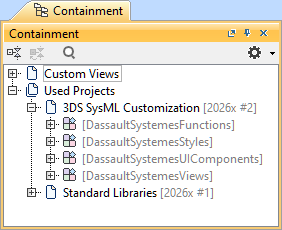
The 3DS SysML Customization library contains the DassaultSystemesStyles namespace, dedicated to symbol styles' customization:
- <DS_Styles> DassaultSystemesStyles
- CoreStylesComponents
- Contains style sheet modeling and configuration concepts.
- KerMLStyles. Contains primary style definitions that can be reused (subclassified) for style sheet rules.

For a list of the primary style definitions, their ref items, and their compatibility with element symbols, see the Style sheet conditions and styles tables page.
- SysMLStyles. Contains compartment style view definitions for style sheet rules.
- Predicates. Contains condition part definitions for style sheet rules.
To learn more about reusing and modifying existing or creating custom rules using primary style definitions, see the Customizing style sheet components and Creating style sheet components pages.
- StyleSheets. Contains predefined style sheets.
You can reuse and customize the predefined style sheets or create new ones from scratch. See the Creating style sheets page.
- ColorDefinitions. Contains color definitions for style sheet rules.
- You can reuse and customize the predefined style definitions. See the Customizing style sheet components page.
- For a list of predefined style definitions, see the Symbol styles table on the Style sheet conditions and styles tables page.
- CompartmentVisibilityDefinitions. Contains compartment visibility definitions for style sheet rules.
- ColorDefinitions. Contains color definitions for style sheet rules.
- CoreStylesComponents