Element symbols, including shapes and paths, are displayed on views based on the symbol styles defined in the style sheets in the 3DS SysML Customization library that is loaded in every project. You can modify element symbol styles according to your preferences by working with style sheets.
Types of style sheet specification:
- Predefined style sheets
Each SysML v2 project is automatically loaded with the 3DS SysML Customization library that contains predefined style sheets comprised of sets of rules defining symbol styles based on element metaclass. The DefaultStyleSheet style sheet contains model-based styles that apply to all element symbols in SysML v2 projects by default based on element metaclass.
- Custom style sheets
Instead of or in addition to using the existing style sheets, you can also create custom style sheets with your own sets of rules for symbol styles. - Modifying styles of individual symbols
Whether using a default or a custom style, you can customize the styles of individual symbols. Using the Symbol Style dialog, you can specify the style properties for specific symbols, determining their appearance. Changing the styles for an individual symbol via the Symbol Style dialog overwrites predefined and custom model-based symbol styles; the modifications persist even after updating active style sheets. - Modifying styles of individual views
Whether using a default or a custom style, you can customize the styles of individual views. Using the View Style dialog, you can specify the style properties for specific views, determining their appearance. Changing the styles for an individual view via the View Style dialog overwrites predefined and custom model-based symbol styles; the modifications persist even after updating active style sheets.
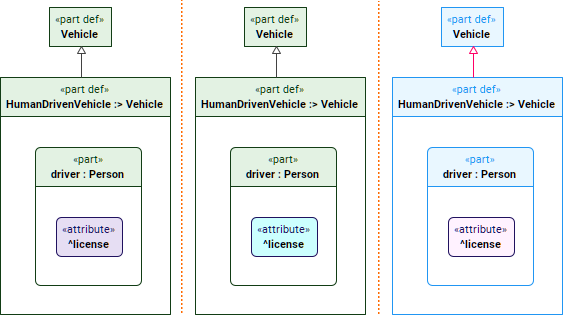
On the left: symbol styles using a predefined style sheet DefaultStyleSheet.
In the middle: symbol styles using a predefined style sheet DefaultStyleSheet with the customized style for the individual attribute symbol.
On the right: symbol styles using a custom style sheet.