Predefined style sheets
Each SysML v2 project is automatically loaded with the 3DS SysML Customization library that contains predefined style sheets comprised of sets of rules defining symbol styles based on element metaclass. The predefined style sheets are located in the StyleSheets package in the <DS_Styles> DassaultSystemesStyles namespace of the 3DS SysML Customization library.
There are two predefined style sheets in the DS_Styles::StyleSheets package:
- DefaultStyleSheet
The DefaultStyleSheet style sheet contains rule-based styles that apply to all element symbols in SysML v2 projects by default based on element metaclass.- You can view the predefined style definitions used for symbol styles in the 'Predefined style definitions' column in the Symbol styles table on the Style sheet conditions and styles tables page, and the DS_Styles::StyleSheets::ColorDefinitions package.
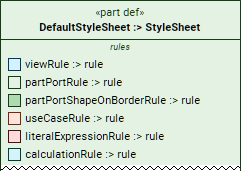
- You can view the predefined style definitions used for symbol styles in the 'Predefined style definitions' column in the Symbol styles table on the Style sheet conditions and styles tables page, and the DS_Styles::StyleSheets::ColorDefinitions package.
- BlackAndWhiteStyleSheet
The BlackAndWhiteStyleSheet style sheet contains rule-based styles for representing all element symbols in black and white style.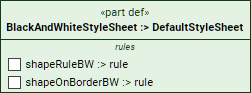
You can:
- Use the default style sheet (default functionality).
- Switch between style sheets (predefined and/or custom ones). See the Activating style sheets page.
- Create your own style sheets either by reusing and customizing an existing (predefined or custom) style sheet (e.g., DefaultStyleSheet) or creating your own. See the Custom style sheets and Creating style sheets pages.
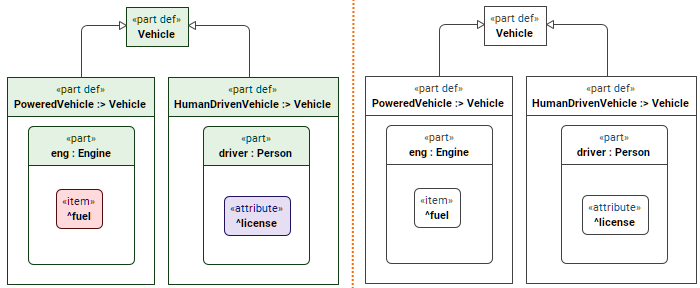
Symbol styles represented by the DefaultStyleSheet (left) and BlackAndWhiteStyleSheet (right) style sheets.
Accessing predefined style sheets
To access the predefined style sheets
- In the Containment tree, expand the following nodes: Used Projects>3DS SysML Customization>DassaultSystemesStyles>StyleSheets.
- Right-click the StyleSheets package and in the shortcut menu, click Open under Textual Editor. The style sheets' textual notation is opened in the Textual Editor.
DefaultStyleSheet style sheet components
The DefaultStyleSheet style sheet contains multiple rules for symbol styles conditioned by element metaclass. The styles applied to the rules use predefined style definitions. You can view them once you access the style sheet.
DefaultStyleSheet rules
The rules are structured with comments based on the element metaclass and look like the following:
/* -------------PART/PORT---------*/
part partPortRule :> rule {
part :>> condition : ByElementMetaclassCondition {
ref item :>> elementMetaclass = (SysML::Systems::PartUsage.metadata, SysML::Systems::PartDefinition.metadata, SysML::Systems::PortUsage.metadata,
SysML::Systems::PortDefinition.metadata);
}
view :>> style : AbstractGreenStyle;
}
DefaultStyleSheet predefined style definitions
You can view the full list of predefined style definitions in the 'Predefined style definitions' column on the Style sheet conditions and styles tables page.
The predefined style definitions are listed in the DS_Styles::StyleSheets::ColorDefinitions package and look like the following:
/* ------------------colors---------------------- */
view def AbstractGreenStyle :> ShapeStyle {
attribute :>> fillColor default "#E3F2E3";
attribute :>> compartmentFillColor default "#F6FBF6";
attribute :>> penColor default "#123D15";
}