N-ary interface
An n-ary interface is a complex connector between three or more ports. The n-ary interface is displayed as a dot symbol with segments connecting the ends of the interface.

- The ends of an interface definition or usage must be port usages.
- The port keyword is optional for interface ends. The keyword is mandatory if the ends have owned cross features.
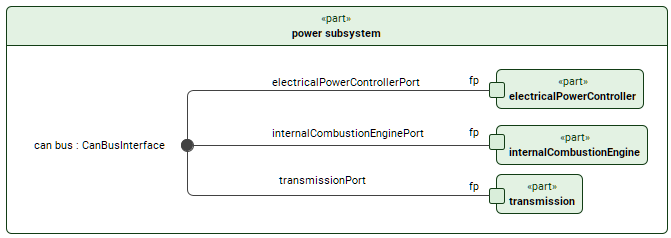
Creating n-ary interfaces
Creating n-ary interfaces via the Textual Editor
To create n-ary interfaces via the Textual Editor
- In the Textual Editor, place the cursor where you want to create the element and declare the interface keyword.
- Specify the element name (optional), specialization (optional), then the connect keyword, then state the feature ports explicitly (using the connect...to syntax) or in a comma-separated list of related features.
- If the interface has no name and no specialization, the keyword connect can be omitted.
- You can also name interface end ports, associating them to feature ports via reference subsetting.
- Click the Synchronize button.
interface def CanBusInterface {
end port transmissionPort : CanBusPorts;
end port electricalPowerControllerPort : CanBusPorts;
end port internalCombustionEnginePort : CanBusPorts;
}
part 'power subsystem' {
part electricalPowerController { port fp; }
part transmission { port fp; }
part internalCombustionEngine { port fp; }
// named specialized (feature typing) interface usage with named end ports connecting feature ports in a comma-separated list:
interface 'can bus' : CanBusInterface connect (transmissionPort ::> transmission.fp, electricalPowerControllerPort ::> electricalPowerController.fp, internalCombustionEnginePort ::> internalCombustionEngine.fp);
// unnamed unspecialized interface usage connecting feature ports in a comma-separated list:
interface (transmission.fp, electricalPowerController.fp, internalCombustionEngine.fp);
}
Creating n-ary interfaces via the view palette
To create n-ary interfaces via the view palette
- In the view palette, under the Connectors group, click the n-ary interface button. If it is not displayed, click the down-facing arrow next to the interface button and click the n-ary interface button in the dropdown menu.
- Click in the view pane where you want the n-ary interface symbol to be created.
- Select the n-ary interface symbol and in its smart manipulator, click the end command.
- Draw the end from the n-ary interface symbol to the symbol of the port you want to connect. Repeat for all ports you want to connect.
Converting binary and n-ary interfaces
Converting binary interface to n-ary via the view
To convert binary interface to n-ary via the view
- In the view pane, right-click the binary interface you want to convert to an n-ary.
- In the shortcut menu, click Refactor, then Convert to N-ary Dot. The binary interface is converted and the n-ary dot symbol is displayed.
Converting n-ary interface to binary via the view
To convert n-ary interface to binary via the view
- In the view pane, right-click the n-ary dot symbol of the interface you want to convert to a binary.
- In the shortcut menu, click Refactor, then Convert to Path. The n-ary interface dot symbol is converted and the binary path is displayed.
The Convert to Path command is only available if the dependency has no more than two ends.
Creating n-ary interface definition
Creating n-ary interfaces definition via the Textual Editor
To create n-ary interfaces definition via the Textual Editor
- In the Textual Editor, place the cursor where you want to create the element and declare the interface def keyword followed by its name.
- Name the element, then specify the interface definition features in the element body:
- Specify the interface definition ends by declaring the end keyword, followed by the end name and/or specialization of the needed port.
Click the Synchronize button.
interface def CanBusInterface {
end port transmissionPort : CanBusPorts;
end port electricalPowerControllerPort : CanBusPorts;
end port internalCombustionEnginePort : CanBusPorts;
}
Auto-creating n-ary interface definition elements via the Extract Definition command
To auto-create n-ary interface definition elements via the Extract Definition command
- See the Extract Definition and Usage page.
Creating n-ary interface definitions via the view palette
To create n-ary interface definitions via the view palette
In the view palette, under the Connectors group, click the interface def button.
If the needed button is not displayed, click the down-facing arrow next to either the interface or the n-ary interface button and select the needed button in the dropdown menu.
- Click in the view pane where you want to create the interface def symbol. The interface def symbol is created containing two end element symbols.
- Create additional ends:
- Via the Create Element button's end command. See the procedure Creating elements via compartments on the Compartments page.
- In the view palette, under the Items/Ports/Attributes group, click the port button. Click on the interface def symbol to create a port for it.
- Create additional ends: