Requirement decomposition
A requirement definition or usage may be decomposed into a requirements tree of nested requirement usages (subrequirements), which may themselves be further decomposed. Any nested requirement usage is automatically considered to be a required constraint of the containing requirement definition or usage, i.e., nested requirements must be satisfied for the containing requirement to be satisfied. Requirements can be grouped either by composition, or reference.
Decomposing requirement definitions
You can represent the next level of decomposition of a requirement definition using the feature typing (defined by) relationship.
Decomposing requirement definitions via the Textual Editor
To decompose requirement definitions via the Textual Editor
- In the Textual Editor, identify the requirement usage that you want to define, nested within a requirement definition.
- Define the requirement by the requirement definition.
requirement def VehicleSpecification {
requirement fullVehicleMassLimit : MassRequirement; // requirement usage, owned by a requirement definition, defined by another requirement definition
requirement emptyVehicleMassLimit : MassRequirement;
}requirement def MassRequirement;
Displaying decompositions of requirement definitions in a view
To display decompositions of requirement definitions in a view
- In a view, select the requirement definition symbol and the requirement usage symbol it defines, then use the Display Specializations command under the In-Between Relationships category.
The feature typing relationship is displayed.
Decomposing composite requirement usages
You can display a requirements tree, i.e., how a requirement is composed of other requirements, which can be done by one of the following options:
- composition - defines owned subrequirements via the feature membership relationship. In the textual notation, subrequirements are nested in the body between the curly braces of the owning requirement.
- reference - defines requirements not owned by the overall requirement, which only references other requirements as subrequirements. In this case, subrequirements are modeled as required constraints in graphical and textual notations.
Decomposing composite requirement usages via the Textual Editor
To decompose composite requirement usages via the Textual Editor
- In the Textual Editor, within the body of the requirement you want to decompose, create the new requirement usages.
- Click the Synchronize button.
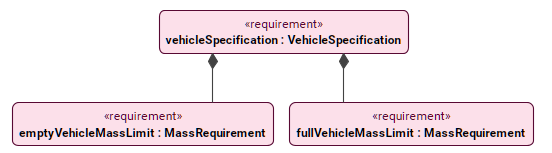
requirement vehicleSpecification : VehicleSpecification {
requirement fullVehicleMassLimit : MassRequirement; // the owning requirement usage with nested requirement usages
requirement emptyVehicleMassLimit : MassRequirement;
}
Decomposing composite requirement usages via a view by creating a composite requirement
To decompose composite requirement usages via a view by creating a composite requirement
- In a view, create or display the requirement for which you want to create a composite requirement.
- Create an owned requirement in one of the following ways:
- Via the view palette (requirement symbol option):
- In the view palette, under the Requirements group, click the requirement button to create a requirement usage element.
- Click on the requirement symbol displayed in the view pane to create a requirement owned by another.
- Via the view palette (feature membership option):
- In the view palette, under the Other Relationships group, click the feature membership button.
- First, click on the requirement symbol displayed in the view pane and then click anywhere in the view pane to create a requirement owned by another.
- Via the smart manipulator (feature membership option):
- Click the requirement symbol for which you want to create a nested requirement.
- In its smart manipulator, click the feature membership icon.
- Click anywhere in the view pane to create a requirement owned by another.
- Via the view palette (requirement symbol option):
Decomposing composite requirement usages via a view by designating an existing requirement as a composite one
To decompose composite requirement usages via a view by designating an existing requirement as a composite one
- In a view, create or display the requirements you want to designate as the owner and the owned.
- Designate an existing requirement as owned by another in one of the following ways:
- Via the view palette (feature membership option):
- In the view palette, under the Other Relationships group, click the feature membership button.
- First, click on the requirement symbol you want to designate as the owner, then the one you want to designate as the owned one.
- Via the smart manipulator (feature membership option):
- Click the requirement symbol you want to designate as the owner.
- In its smart manipulator, click the feature membership icon, then click on the requirement you want to designate as the owned one.
- Via the view palette (feature membership option):
Displaying decompositions of composite requirement usages in a view
To display decompositions of composite requirement usages in a view
- In a view, select the owning requirement usage symbol and use the Display Features command under the Tree-View Style category.
The feature membership and the owned features (requirement usages) are displayed.
Decomposing referencial requirement usages
In addition to having owned subrequirements, a requirement can also reference other requirements.
Decomposing referencial requirement usages via the Textual Editor
To decompose referencial requirement usages via the Textual Editor
- In the Textual Editor, within the curly braces of the requirement body within which you want to reference other existing requirements, declare the require keyword.
- Follow with the name of the requirement you want to reference.
- Click the Synchronize button.
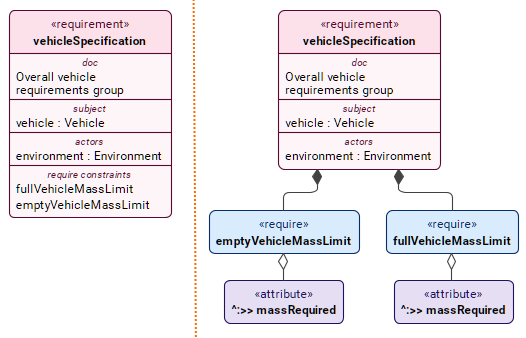
requirement vehicleSpecification : VehicleSpecification { // the grouping requirement
doc /* Overall vehicle requirements group */
subject vehicle : Vehicle;
actor environment : Environment;
require fullVehicleMassLimit; // the requirement fullVehicleMassLimit is grouped by reference via the require keyword
require emptyVehicleMassLimit; // the requirement emptyVehicleMassLimit is grouped by reference via the require keyword
}// The subject of the following subrequirements are implicitly bound to the subject "vehicle" of the containing requirement.
requirement fullVehicleMassLimit : MassRequirement { // the requirement that is grouped via the require keyword
attribute :>> massRequired = 2000 [kilogram];
}
requirement emptyVehicleMassLimit : MassRequirement { // the requirement that is grouped via the require keyword;
attribute :>> massRequired = 1500 [kilogram];
}
Decomposing referencial requirement usages via the Drag and Drop handler in a view
To decompose referencial requirement usages via the Drag and Drop handler in a view
- Drag and drop a requirement element or use its symbol's Drag and Drop handler on another requirement element symbol using the Create Require Constraint command. See the Drag and Drop handler page.
Displaying decompositions of referencial requirement usages in a view
The required constraints are displayed in the requirement symbol's compartment 'require constraints'. However, you can also display them separately.
To display decompositions of referencial requirement usages in a view
- In a view, select the owning requirement usage symbol and use the Display Features command.
The requirements, feature memberships, and required constraints are displayed.
Reusing and modifying the requirement tree
A requirement can subset another requirement facilitating requirement tree reuse and modification. The subsetting requirement inherits the requirement decomposition and other features. You can then modify the inherited requirements and features through redefinition and subsetting in addition to adding requirements.
Reusing and modifying a requirement tree via the Textual Editor
To reuse and modify a requirement tree via the Textual Editor
- In the Textual Editor, declare the requirement usage you want to reuse, then subset it.
- (Optional) Redefine or subset the requirement features in the element body.
- Click the Synchronize button.
requirement vehicleSpecification : VehicleSpecification { // subsetted (reused) requirement
requirement fullVehicleMassLimit : MassRequirement;
requirement emptyVehicleMassLimit : MassRequirement;
}
requirement newVehicleSpecification :> vehicleSpecification { // a requirement reuses the requirement tree by subsetting another requirement
requirement fullNewVehicleMassLimit :> fullVehicleMassLimit;
}
Reusing a requirement tree via the view palette
To reuse a requirement tree via the view palette
- In a view, create or display the requirement whose decomposition you want to reuse.
- In the view palette, under the Specializations group, click the subsetting button.
- Click on the requirement you want to denote as the subsetting one and then click on the requirement you want to denote as the subsetted (reused) one.
Displaying the requirement tree reuse in a view
To display the requirement tree reuse in a view
- In a view, select the subsetting and the subsetted requirement usage symbols, then use the Display Specializations command under the In-Between Relationships category. The subsetting relationship is displayed.
- (Optional) To display owned features of the subsetting or subsetted requirements, use the Display Features command. The owned features (requirement usages) are displayed.
