Swimlane grid
The swimlane grid symbol allows you to model and organize actions based on the elements responsible for performing those actions. Each swimlane in the swimlane grid represents the system element responsible for performing actions displayed in the corresponding swimlane. The represented elements are easily identifiable as their names are indicated in the headers of each swimlane with the keyword «performer», indicating their role of being responsible for performing actions displayed in their corresponding swimlanes.
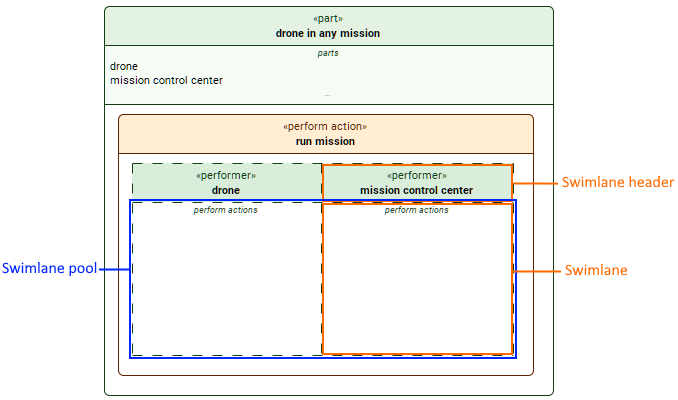
The swimlane grid symbol is comprised of two sections:
- The swimlane headers display each swimlane referent's name, i.e., the names of the elements responsible for performing actions displayed in the specific swimlanes.
- The swimlane pool is comprised of individual swimlanes. The swimlane pool allows you to easily model actions and their sequencing based on their performers, i.e., the elements that perform these actions, displayed as separate swimlanes.
- The individual swimlanes display actions performed by the swimlane referents whose names are indicated in the swimlane headers with the keyword «performer».
The swimlane grid symbol can be displayed for the following elements:
- perform action. Its swimlanes represent the subparts of the part that owns and/or inherits the perform action. The perform action element symbol owns the swimlane grid symbol.
- For more information, see the Modeling actions with swimlanes page.
- include use case. Its swimlanes represent the subject and actor parameters owned and/or inherited by the include use case. The include use case element symbol owns the swimlane grid symbol.
- For more information, see the Use case scenario page.
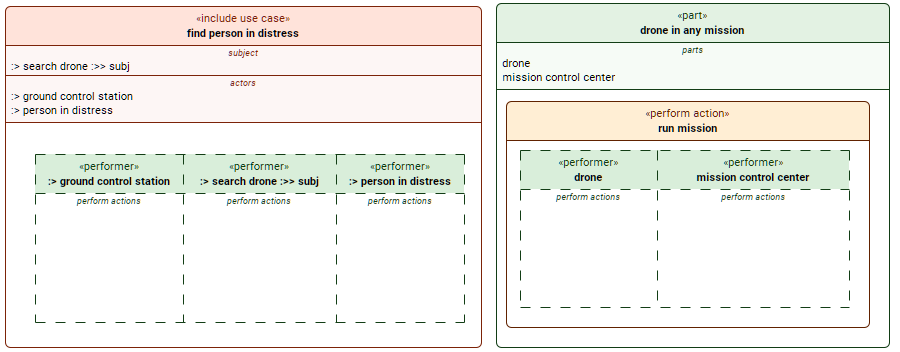
Examples of the swimlane grid symbol in include use case and perform action element symbols.
The find person in distress include use case's subject and actors are represented by the swimlanes.
The drone in any mission part's subparts are represented by the swimlanes displayed for the perform action owned by the containing part.
Working with the swimlane grid
To perform the following procedures, the perform action or the include use case that contains the actions (or would contain if they are not created yet) performed by swimlane referents must be displayed in the view.
Displaying swimlane grid and creating additional swimlanes
To display swimlane grid and create additional swimlanes
- To display the swimlane grid:
- Right-click the perform action/include use case symbol and in the shortcut menu, click Display, then Display Swimlanes.
The swimlane grid is displayed with swimlanes (along with any actions and connectors that may already be defined in the model), representing elements owned or inherited by the element that owns or inherits the perform action/include use case.
- Right-click the perform action/include use case symbol and in the shortcut menu, click Display, then Display Swimlanes.
- To create additional swimlanes:
- Select the header of an existing swimlane and click the + button on the left or the right side of the swimlane, to create a swimlane to the left or the right of the existing one.
Creating a new swimlane creates:- a subpart for the element that owns or inherits the perform action, represented by the new swimlane.
- an actor for the include use case, represented by the new swimlane. However, no related subpart is created for the part that owns or inherits the include use case.
- Select the header of an existing swimlane and click the + button on the left or the right side of the swimlane, to create a swimlane to the left or the right of the existing one.
Displaying actions in swimlanes
To display actions in swimlanes
- Select one swimlane by right-clicking its header or all swimlanes by right-clicking the swimlane pool. In the shortcut menu, click Display, then Display Actions in the dropdown menu.

The specific swimlane's shortcut menu contains the same commands as the element symbol it represents.
Displaying parameters, connectors, or other features for element symbols in swimlanes
To display parameters, connectors, or other features for element symbols in swimlanes
- Right-click the element symbol(s) in the swimlane(s). In the shortcut menu, click Display, then click the appropriate command in its dropdown menu.
Rearranging swimlanes
To rearrange swimlanes
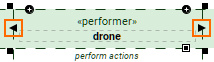
- Click the header of a swimlane, then the displayed control arrows to move the swimlane left or right.
Moving the swimlane grid symbol
To move the swimlane grid symbol
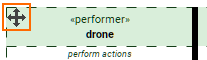
- Click anywhere on the swimlane pool. The Move icon at the top left of the swimlane grid symbol appears.
- Click the Move icon and move the swimlane grid symbol.