Cameo Simulation Toolkit allows you to evaluate duration constraints between Call Messages and Reply Messages, e.g., you can specify that a Call Message must get a Reply Message in 500 ms, so the actual duration of operation method execution must be compared with the duration constraint of 500 ms. The comparison is done as an evaluation of the constraint and will generate a fail value for testcases or stop at breakpoints on the Constraint Failure As Breakpoint option. However, it does not support the delay time of a message. delay delivery of a pair of consecutive messages using a duration constraint. The default time unit of the duration constraint is the millisecond (ms), but you can also use other time units by specifying it them after a the duration value, e.g. For example, you can use 10s to denote 10 seconds. Cameo Simulation Toolkit uses If you specify both the minimum and maximum values, Simulation will use the maximum value of a the duration constraint to delay the delivery of a message if you specify both the minimum and maximum values.
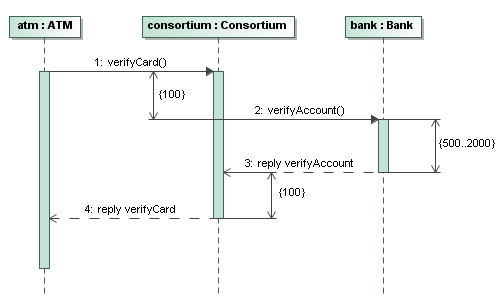 Image RemovedDuration Constraints between Messages Image RemovedDuration Constraints between MessagesMessage. 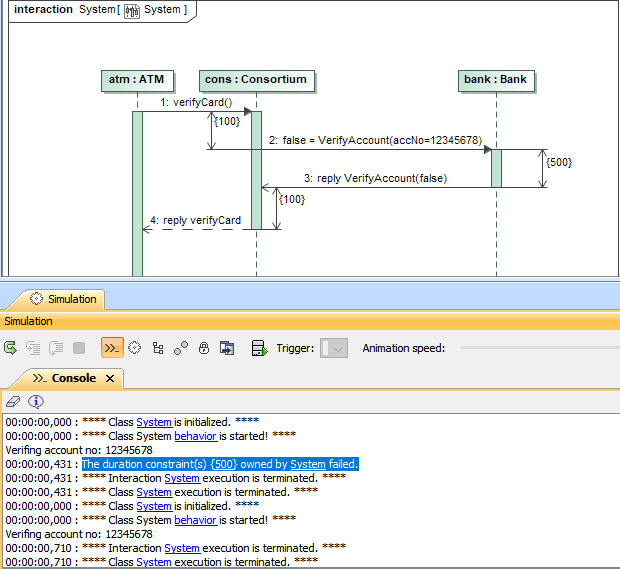 Image Added Image Added
A Sequence diagram showing how a duration constraint Duration Constraint {500} can be used to delay the delivery of a pair of consecutive messagesevaluate between the Call Message and Reply Message.The preceding figure shows that atm sent the first message to consortium to verify a card. The consortium replied the bank to verify the account by sending the second message after 100 milliseconds. The bank then sent the third message to the consortium after 2000 milliseconds (Cameo Simulation Toolkit uses the maximum value to delay delivery of the message). Finally, consortium sent a reply to atm by sending the fourth message 100 milliseconds after it received the third message. 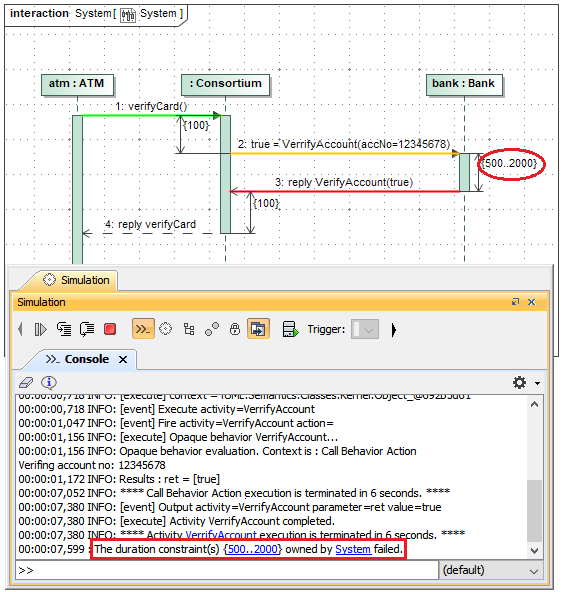 Image RemovedDuration constraints between a Call Message and Reply Message fail as breakpoint with a warning message on the Console pane. Image RemovedDuration constraints between a Call Message and Reply Message fail as breakpoint with a warning message on the Console pane.
| Warning |
|---|
| 