| Note |
|---|
This tab will appear in the Window menu only if the SysML plugin is installed. |
| Excerpt Include |
|---|
| MD2024xR3SYSMLP2024xR1:Structure tabMD2024xR3 |
|---|
| SYSMLP2024xR1:Structure tab |
|---|
| nopanel | true |
|---|
|
Structure tab toolbar
The Structure tab toolbar contains the following buttons:
Button | Tooltip text | Description |
 Image Added Image Added
| Collapse All | Collapses all of the currently expanded elements in the Containment tree. |
 Image Added Image Added
| Collapse Selected Recursively | Collapses only selected node and all subnodes in that node. |
 Image Added Image Added
| Open in New Tree | Opens the contents of the selected element in a new tab of the Model Browser. The selected element becomes the root node of the new tree. You can choose to open elements in: - New Containment Tree
- New Structure Tree
- New Inheritance Tree
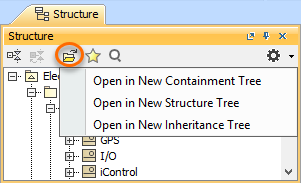 Image Added Image Added
|
 Image Added Image Added
| Favorites | Opens the Favorites menu for choosing to do one of the following: - Add a selected element to favorites
- Open the dialog for managing favorites
- Navigate to a desired favorite in the Containment tree
|
 Image Added Image Added
| Quick Find | Opens the Quick Find dialog. |
 Image Added Image Added
| Options | Click to open the Options menu and then select: - Filter - opens the Select Element Type dialog wherein you can select element types to be visible in the Containment tree. Learn more on the Filtering page.
- Show Auxiliary Resources - shows or hides modules and profiles that are used in your project.
- Show Applied Stereotypes - shows or hides the applied stereotypes next to the element name in the Containment tree.
- Nest Satisfied Requirements - shows requirements nested within elements that satisfy them.
- Show Inherited Structure - shows properties that are inherited from the generalization classifier.
- Show Full Types - shows or hides the full types of typed elements (for example, operations, attributes, relationships, and other) in the Containment tree.
- Show Code Engineering Sets - shows or hides the code engineering sets.
|
