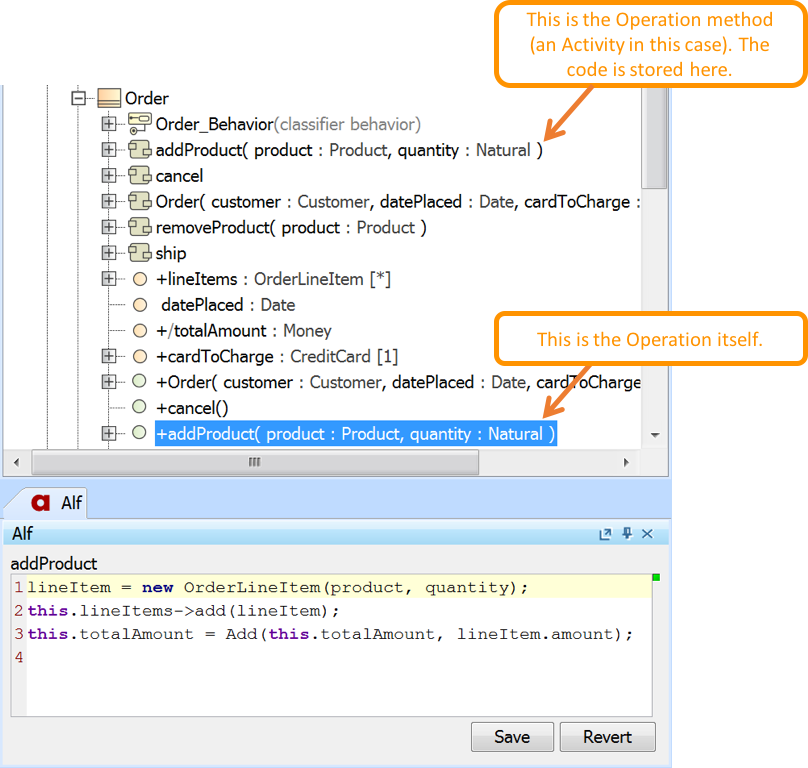
In UML, the behavior of an Operation of a Class can be defined using a Behavior element called the method of the Operation. You can use the Alf editor to create an Alf body for a new Operation method or to edit the existing Alf body of a method.
To create an Alf body for a new method
- Select the Operation in the Model Browser or on a Class diagram and open the Alf editor window (select Windows > Alf), if it isn't already open.
- If the Operation has no method yet, then no code will appear in the Alf editor window, but the Create button will be active.
- Press Create to create a method for the operation.
- Enter the Alf code for the Operation and press Save to compile and save the code.
To edit an existing Alf body for an Operation
Select the Operation in the Model Browser or on a Class diagram and open the Alf editor window (select Windows > Alf), if it isn't already open. The existing Alf code will appear in the window.
The Alf code for an Operation is actually stored as the Alf body of the method Behavior of the Operation (which is an Activity or Opaque Behavior, as created above). It is therefore possible to directly the edit the code on the method Behavior (as described in Using Alf to define Behaviors), but it is usually easier to act directly on the Operation.