

You can use the Alf editor to create an Alf body for the effect Behavior of a Transition in a State Machine or to edit the existing Alf body of an effect Behavior.
To create an Alf body for an effect Behavior
- Select the Transition (in the Model Browser or as represented on a State Machine diagram) and open the Alf editor window (select Windows > Alf), if it isn't already open.
- In the Alf editor window, press Create. A menu will pop up with available options for creating Transition Behaviors.
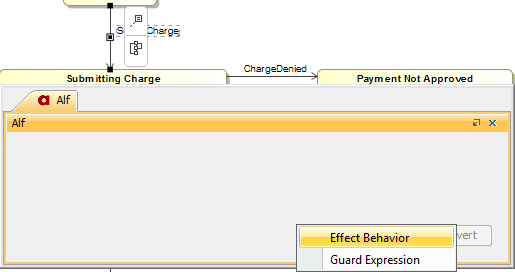
- Select Effect Behavior.
Enter the Alf code for the Behavior and press Save to compile and save it.
The Alf code for an effect Behavior can access attribute values of the context Classifier of the State Machine containing its Transition (using Alf this expressions). It can also access the data in the Event occurrence that triggered its execution (e.g., the attribute data of a received Signal).
To edit the Alf code for an effect Behavior
Select the Transition (in the Model Browser or as represented on a State Machine diagram) and open the Alf editor window (select Windows > Alf), if it isn't already open. The Alf code will appear in the window.
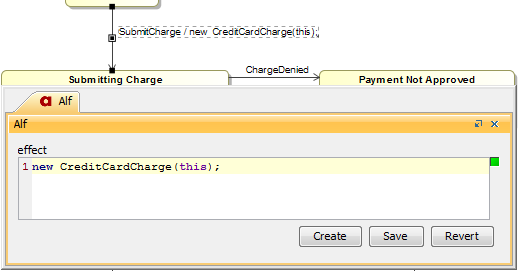
Even while you are editing an existing effect Behavior, the Create button stays active if the Transition does not have a guard. Press Create in order to create a guard expression on the Transaction.
If you create an effect Behavior as an Opaque Behavior, then Alf code for it can also be entered or edited directly in the Body and Language property for it in the Specification window for the Transition. If you open the Edit Body and Language window, then the Alf code may be edited just as in the Alf editor window. However, instead of Save and Revert buttons, this window has OK and Cancel buttons, either of which will close it. If you press OK, then the text is saved, and, if it has no errors, compiled. If you press Cancel, the Alf text is not saved.
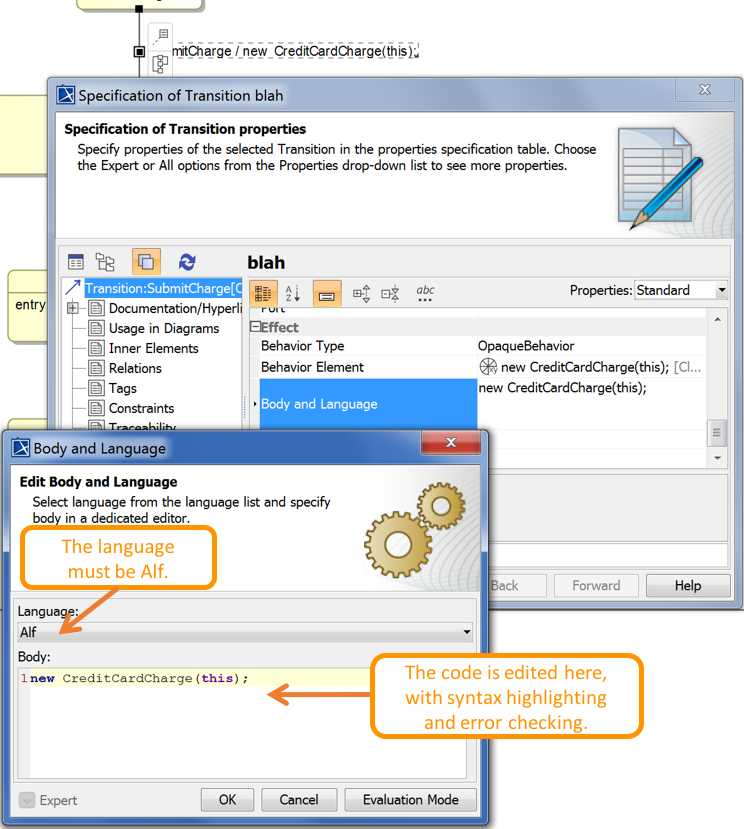
Editing Alf code for a Transition effect Behavior in an Opaque Behavior body
To be recognized as Alf code, the Body of an Opaque Behavior must have the Language Alf. If your project was created using the Alf project template, then Alf will be the default language. Otherwise, select Alf from the Language menu (you may have to scroll upwards in the menu to find the selection for Alf).
To make Alf the default language for Opaque Behaviors
- Select Options > Project.
- On the left, under Default model properties, select Opaque Behavior.
- Click on the Language field and then on the small + button on the right.
- Enter Alf (spelled and capitalized in exactly that way) and click on OK.
- Click on OK to close the options window.