Log in
No Magic Product Documentation
Spaces
Hit enter to search
Help
Online Help
Keyboard Shortcuts
Feed Builder
What’s new
About Confluence
Log in
Cameo DataHub 2024x Refresh3
Edit space details
Scroll Content Manager
Page tree
Browse pages
Configure
Space tools
Document toolbox
A
t
tachments (2)
Page History
Page Information
Resolved comments
View in Hierarchy
View Source
Export to PDF
Export to Word
Export to HTML
Export to PDF
Pages
…
Cameo DataHub Documentation
User Guide
Working with DataHub and modeling tools
Requirement Mapping
Jira links
Scroll page details
Importing a schema map
Created by
Ranveersinha A.
on
Sept 03, 2024
1 minute read
To import a schema map
On the main menu, click
Tools
>
DataHub
>
Schema Map Manager
. The
Schema Map Manager
dialog opens.
Click
Import
and choose the schema map file. The template will be updated with the new mapping.
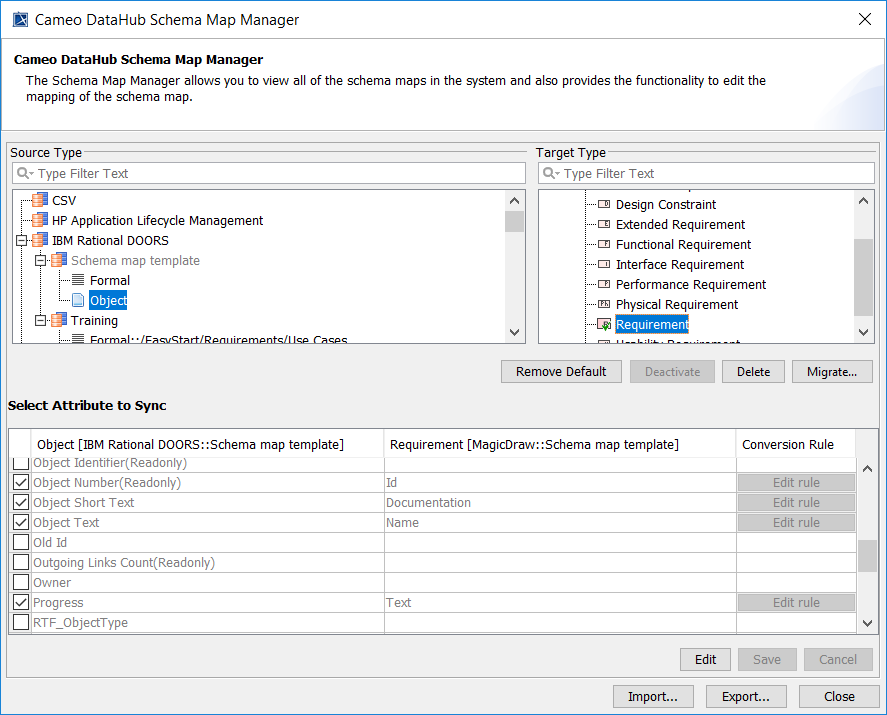
The updated template with the new mapping and without defined attributes.
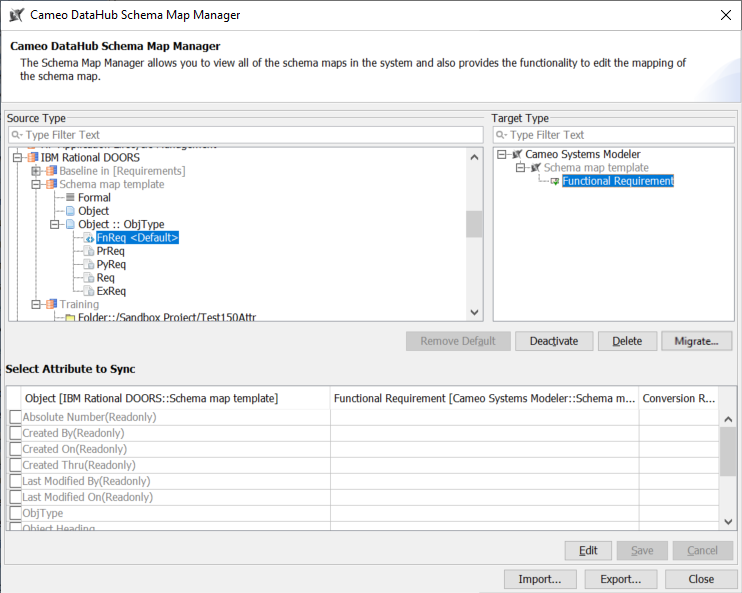
The updated template with the new attribute-defined mapping.
No labels
Overview
Content Tools
{"serverDuration": 56, "requestCorrelationId": "75d5ea9498b9888c"}