


Released on: December 4, 2017
Monte Carlo simulation support
Cameo Simulation Toolkit introduces built-in support for Monte Carlo analysis. This allows managing uncertainty and estimating how random variation of sensitive parameters affects the overall performance of the system being modeled.
- Value distributions are specified using SysML «normal» and «uniform» stereotypes on Value properties.
- The number of initializations and runs of any selected target is specified in Simulation Configuration.
- Values of every iteration can be recorded using CSV Export configuration.
- A new histogram plot can show estimated distribution of the values of interest.
- The MonteCarloAnalysis block provides context, allows capturing and verifying statistical results (mean, standard deviation, and probability of out of spec), and represents them in Instance tables.
- The HingeMonteCarloAnalysis.mdzip sample model demonstrates this capability.
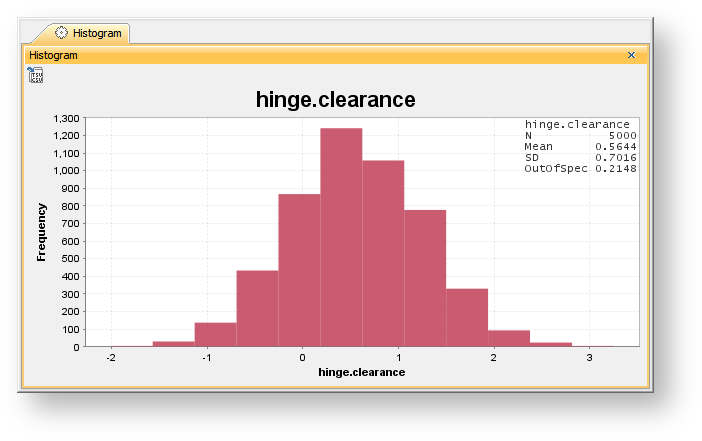 A dynamic histogram showing the distribution of the estimated results of Monte Carlo simulation.
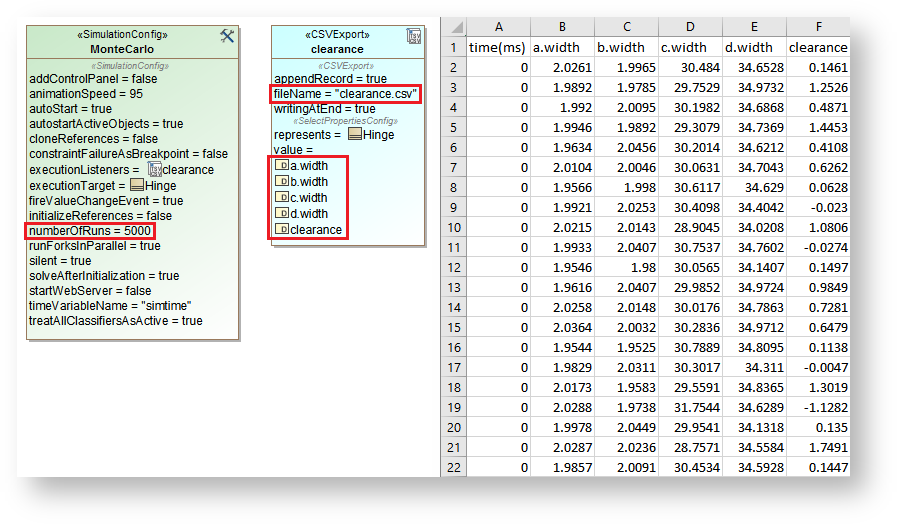 Monte Carlo analysis results exported to CSV.
 Recorded results in the Instance table.
New MATLAB integration
MATLAB R2016b introduces a new official Java API, providing a faster and more reliable interface for CST to communicate. Mac users should be especially happy, as the new API no longer requires disabling System Integrity Protection (SIP). This new integration is available in CST 18.5 SP2 too. Learn more about new MATLAB integration >>
FMI 2.0 support
FMI 2.0 version models can now be imported and co-simulated. Simply drop an *.fmu file into the IBD diagram for interconnections and specify the end time and clock step in Simulation Config. Thanks to customer feedback, the co-simulation master algorithm is enhanced with several small improvements, too. FMI 2.0 co-simulation
More time units
To support a wider variety of the systems and behavioral scenarios, smaller (nanosecond and microsecond) and larger (day, week, month and year) time units are added. Activity duration simulation#Supportedtimeunits
More concepts in the Sequence diagram
- Loop, opt, and alt fragments for repetitive or conditional execution. Combined fragment
- Lifeline selector to specify individual objects from a collection. Lifeline
- Verification of return Message values. Message#ReplyMessage(reply)
- Duration constraints between Call and Reply Messages. Duration constraint
- Improved verification of State invariants and active States. State invariant
Other improvements
- The Export to CSV button in the Timeline chart.
- The Record Plot Data As option (CSV, PNG, or HTML) and the Result File option. Timeline chart#PropertiesoftheTimelinechart
- The Ignored Elements option in Timeline to filter what is represented in plots. Timeline chart#PropertiesoftheTimelinechart
- States and Activities appear in Timeline in the order of occurrence. Timeline chart#UsingaTimelinechart
- Duration constraints on Activities. Activity duration simulation#DurationconstraintsonActivities
- fUML_Library::BasicInputOutput::RealLine support for entering value from Simulation Console. Activity simulation engine#ReadLinesupport
CST documentation
Other resources