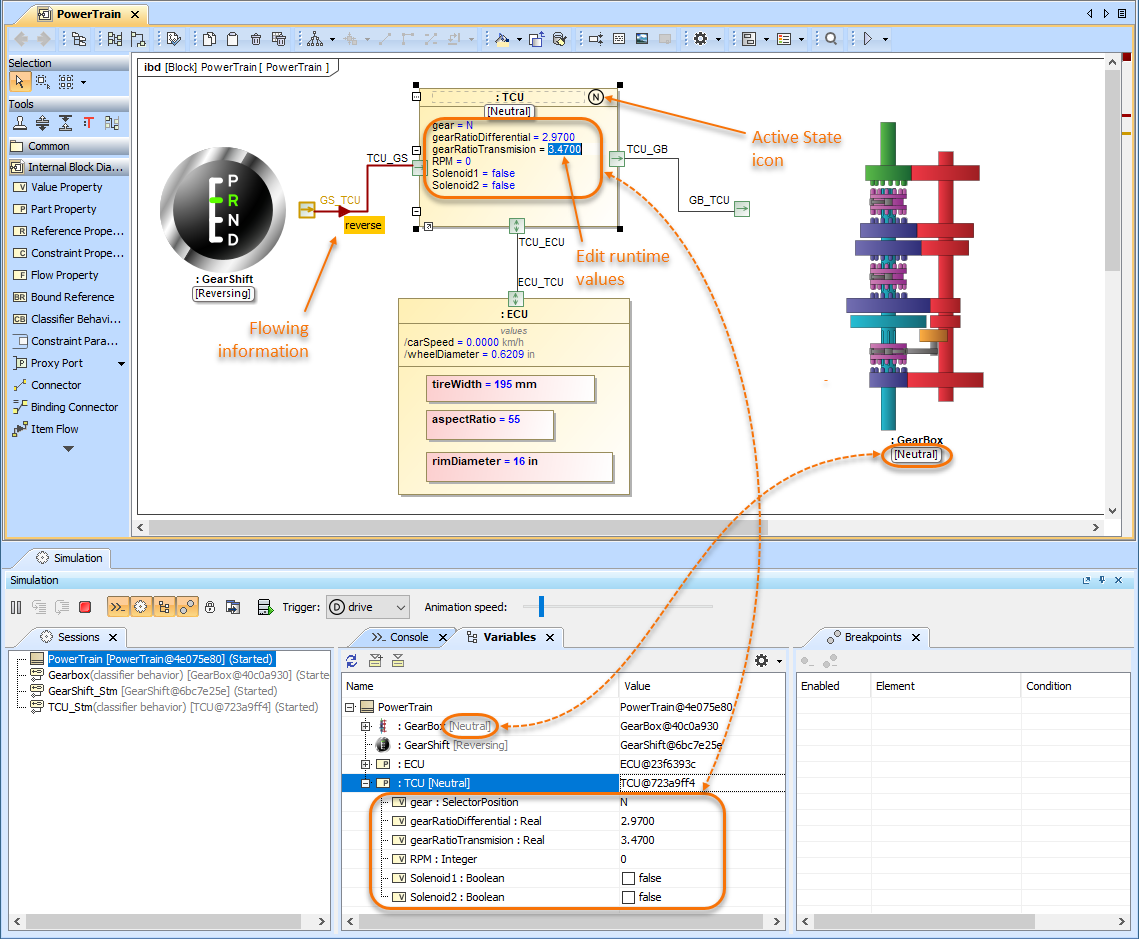
When simulating a model, you can display and manipulate simulation information in diagrams a similar way you do it in the Simulation window. For example, you can see and edit runtime values directly on Part shapes or send a trigger and see a flowing item with its name on a path.
In diagrams, the following simulation information can be displayed:
- Displaying simulation information#Displaying active States
- Displaying simulation information#Displaying active State images
- Displaying simulation information#Displaying runtime values
- Displaying simulation information#Displaying flowing information
In addition, you can manipulate simulation information the following way:
- Manipulating simulation information#Changing runtime values
- Manipulating simulation information#Sending a trigger
Types of diagrams
You can display and manipulate simulation information only in diagrams that are based on a Composite Structure Diagram. However, the flowing information on paths can be displayed both in diagrams based on a Composite Structure Diagram and an Activity Diagram.