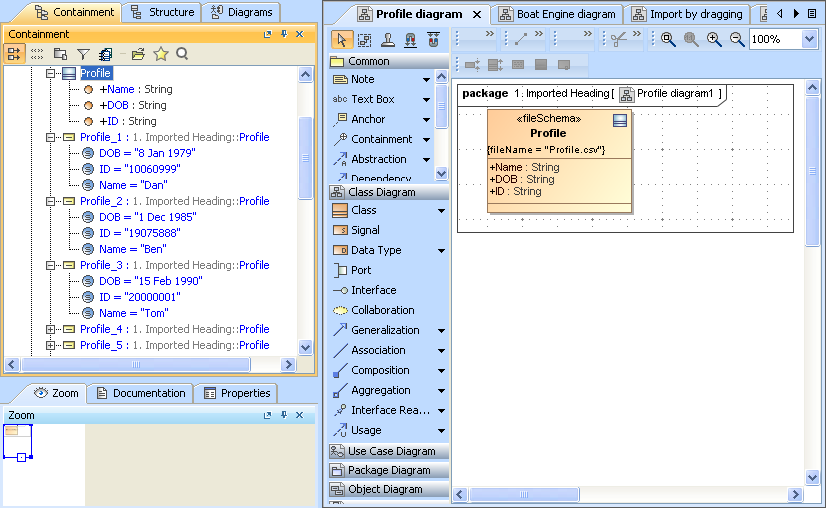
When you are importing table headings from an Excel or CSV file as a schema class, you can also import the rows in the file as instance specifications of the schema class at the same time.You can use the Import Table Heading from Excel menu in the Import Data from Excel and Create Mapping dialog.
To import instance specifications when importing a schema class
- Click File on the MagicDraw main menu and click Import From > Excel/CSV File. The Import Data from Excel and Create Mapping dialog will open and the Import Table Heading from Excel menu will be selected by default, see figure below.
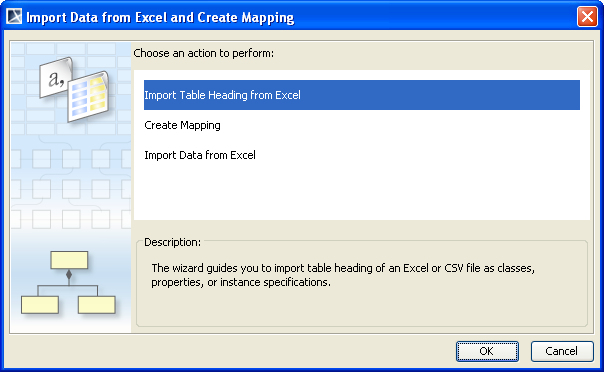
- Click OK. The Import Table Heading from Excel wizard will open, see figure below.
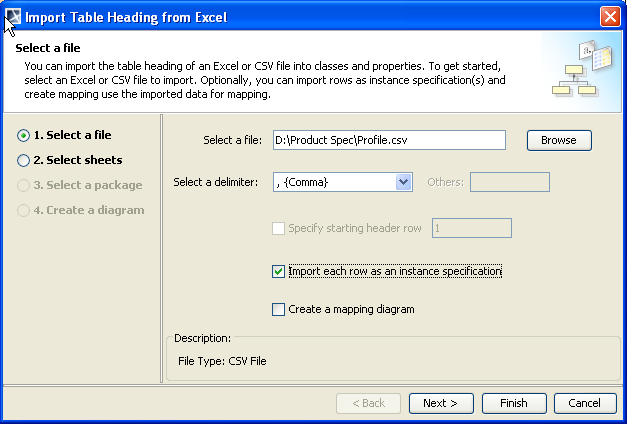
- Click
 to find an Excel or CSV file whose data you want to import both as schema class and instance specifications of the schema class.
 - Select a delimiter (if you select a CSV file) from the
 drop-down list or Comma will be selected as the delimiter by default. Skip this step if you select an Excel file.
 - Select the
 check box.
 - Click either (i)
 to start the import or (ii)
  if you want to select a package as the owner of the imported class and its instance specifications. Otherwise, Data will be selected as the default package. Excel Import will import data from the file both as schema class and its instance specifications, see figure below.