

There are two methods to compare projects:
To compare projects from the Analyze menu
- Open a project you want to compare.
- From the Analyze menu, select Compare Projects. By default, the open project is selected in the Compared box.
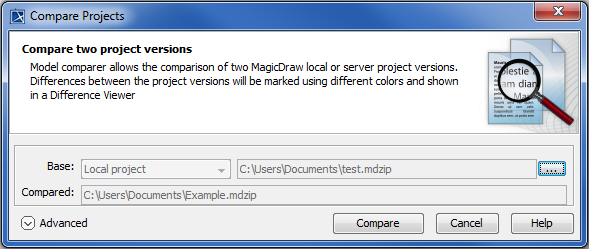
- From the Base box, select a project you want to compare your open project to. The following options are available:
Local project. Click
 and select a project from your file system you want to compare the current project to.
 Server project (a Teamwork Server project or Teamwork Cloud server project). Click
From the Open Server Project dialog, select a project and its version, trunk or branch you want to compare it with. If your compared project is also a server project, you can only choose a server project as a base.
Advanced Compare projects options:
In the same dialog, click the
 Advanced button to see more compare options. The Use the older project as Base option is selected by default. This means that the project whose creation date is older is set as the Base project, while the one that was created later is set as the Compared one (i.e. the projects you indicated as the Compared and the Base might end up being swapped based on their creation date). In this case, all changes are marked as made in the Compared project. If you deselect the Use the older project as Base option, the Base and the Compared projects will remain as you selected them in the Compare Projects dialog.
In the Optimize for drop-down list, select
- Speed, to compare the projects faster. This is the default option and it is sufficient for most projects. Keep in mind that this option requires more memory.
Memory, to compare bigger projects. Sometimes the memory required for the Speed compare mode exceeds the memory available for MagicDraw on your machine. In that case, switch to Memory mode, which conserves memory. However, this option slows the procedure down considerably.
You can also specify the Optimize for option in the Environment Options dialog. Find the option under the Merge and Compare category in the General options group.
Click Compare.
To start comparing projects from the Collaborate menu
Log in to Teamwork Server or Teamwork Cloud server.
To compare project versions in the Teamwork Cloud environment, you are required to have a Read Resources permission for every used project in compared versions.
- On the main menu, click Collaborate, then select either:
- Projects – the Manage Projects dialog opens
- Open Server Project – the Open Server Project dialog opens
- Select the project you want to compare, then click the Project History button
 in the toolbar above project selection list.
 - While holding down Ctrl (or
 ), select the two versions of the server project you want to compare.
 - Click Compare.