

Properties
There are two property meanings used in customization elements: properties specifying the element (in the Specification window), and properties as element attributes. The latter is described in this section.
You can create a property in the customization element, then apply the particular stereotype and create customization rules.
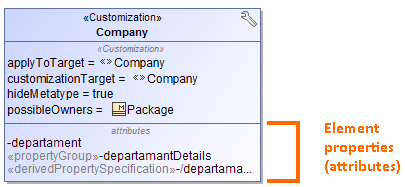
To create a property in the customization element
- In a profile diagram, create a customization element.
- Select the customization element on the diagram.
- Click the
 button. The menu with properties appears.
 - Select the desired property that are described in the following table:
| Attribute | Applied Stereotype | Description |
|---|---|---|
| Property | A named property (aka an attribute of a class) of an element that describes a range of values that can be held by the instances of that element (e.g., a class). | |
Place on Diagram Pallete | «placeOnPaletteProperty» | |
| Property Group | «propertyGroup» | Creates your own groups and subgroups to group the properties either of standard UML metaclasses or stereotypes. |
| Auto Numbering | «AutoNumber» | Creates property used to specify numbering rules for DSL element. |
| Derived Property Specification | «derivedPropertySpecification» | Creates a derived property that is the property, whose values are calculated automatically from the other properties’ values. |
Also, you can create a Meta Property attribute which is used to change the name of the default meta property.
To create a meta property attribute
- According to the preceding procedure, create a property
- Apply the «metaProperty» stereotype to the created property.