

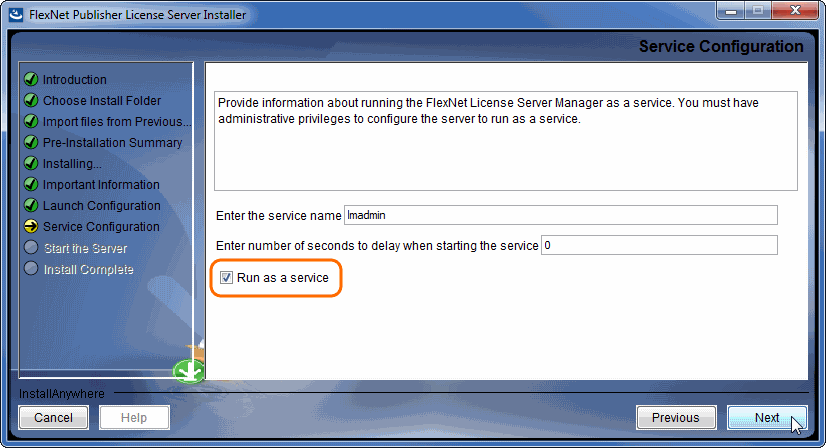
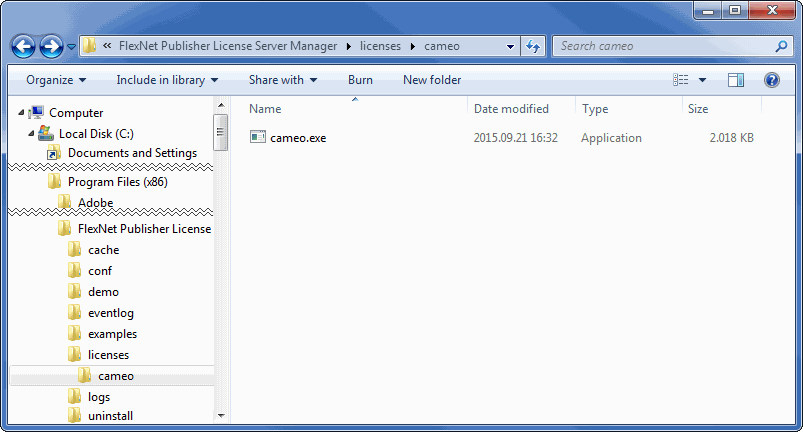
There are three types of the FlexNet server managers. We recommend using lmadmin. If your operating system is Windows: To use lmadmin on Windows platforms, the Microsoft Visual C++ 2008 Redistributable Package (x86) must be installed. You have an option to install this package during the FlexNet Publisher License Server Installer process. Windows 8 Windows Server 2012 Windows Vista (Ultimate) Windows 10 Windows Server 2008, including SP1, SP2, and R2 You have to create a non-root system user with root privileges and install/run the server tools using it: This can be achieved either by: 1. Adding the user to the 'sudo' group 2. Editing the file /etc/sudoers using visudo. Method 1 (Ubuntu based): Method 2 (Ubuntu based): Method 1 (Redhat/Fedora/CentOS) You have to install the Linux Standard Base (LSB) library. For Ubuntu: For Redhat/CentOS/Fedora: For version 11.12.1 we recommend either using the 32 bit lmadmin installer(for multi-arch systems), or the 64bit lmgrd. Installing 32 bit lmadmin on a multi-arch machine will require the 32bit libraries. For recent Ubuntu: For older Ubuntu use: For Redhat/CentOS/Fedora: Running 64bit lmgrd on 64 bit systems requires 64 bit Linux Standard Base (LSB) library. For Ubuntu: For Redhat/CentOS/Fedora: For version 11.14 we recommend either using the 32 bit lmadmin installer, or the 32bit lmgrd for multi-arch systems. 64 bit 11.14 lmadmin/lmgrd binaries are not available. Both of them require 32 bit librarires. Install it using: For recent Ubuntu: For older Ubuntu: For Redhat/CentOS/Fedora: lmadmin 11.14 comes with libssl.so.1.0.0 in its installation directory. Check if LSB was installed successfully using: In order to query which lsb library is required for a particular Centos version, the following command can be executed: It is a best practice to run license servers on a server based OS. FlexNet License Administration Guide by Flexera Software, Inc For more information about FlexNet, see the FlexNet License Administrator Guide. Download the FlexNet server installer from our website. Log in with license owner credentials, if prompted. Install the server manager. We highly recommend running the FlexNet license server (lmadmin) as a service (on Windows). As a result, the server can start automatically after the machine boots. Starting the server manually is not user-friendly – there is no GUI for this action. If your operating system is Windows, you only need to select the Run as a service check box when prompted during the lmadmin installation. For the instructions on how to create a daemon, refer to Automatic Start in License Administration Guide. Open the FlexNet server installation folder. Place the Vendor daemon in <FlexNet server installation folder>\licenses\cameo. Note that all files in FNPLicenseServerManager must have read/write permissions. lmadmin or cameo daemon may not start even if a log file or cameo daemon does not have r/w permissions. Use this command to set permissions for all files within the directory recursively. chmod -R 755 FNPLicenseServerManager Start the server by running the lmadmin file from the FlexNet server installation directory. Download the FlexNet server installer from our website. Log in with license owner credentials, if prompted. Install the server manager. We highly recommend running the FlexNet license server (lmadmin) as a daemon (on OS X or Linux). As a result, the server can start automatically after the machine boots. Starting the server manually is not user-friendly – there is no GUI for this action. For the instructions on how to create a daemon, refer to Automatic Start in License Administration Guide. Open the FlexNet server installation folder. For OS X and Linux users If you don't have permission to open the FlexNet server installation folder, execute the following command from the root: On Linux Place the Vendor daemon in <FlexNet server installation folder>\licenses\cameo. If you come across any issues while installing/running the software, please refer to the Troubleshooting section. license_file_name - the path to the license file. Can use only the license file name if all files are in the same directory. logfile_name - the path to the log file. Can use only the license file name if all files are in the same directory. Make sure the files have read/write privileges. server_port - the port the server is operating on (Not the cameo daemon port) server_host_or_ip_address - the host/address the server is hosted on Prior to using the command, the download of lmutil from our website is required. Navigate to the file via the command line and then execute the command above. Error message while installing 32bit lmadmin on 64bit multi-arch Linux system. The error message is misleading, the solution to fix it, is to install the 32bit libraries. In Redhat/CentOS/Fedora: In recent Ubuntu use: In older Ubuntu use: That may mean that you are missing the correct Linux Standard Base (LSB) library. Also it may mean that you are using a 64bit executable in a 32bit system and vice versa. Install the Linux Standard Base (LSB) libraries to fix it. lmadmin 11.14 comes with libssl.so.1.0.0 in its installation directory. If you install lmadmin on a Linux-based system when logged on as root, you may encounter various issues. For example: Can't make directory /usr/tmp/.flexlm, errno: 2(No such file or directory). This means that directory /usr/tmp used by lmgrd is missing on your system(usually on Ubuntu systems). This error does not impact license checkout. The solution to fix it is to create a symbolic link /usr/tmp pointing to /tmp: Make sure the lmadmin installer has read/write access. or to give read/write privileges to all files within a folder. Then run lmadmin using sudo: If you run into any further problems with installation, please try:Choosing the Flexnet server manager:
Prerequisites
You need to add these libraries in lmadmin directory to the LD_LIBRARY_PATH in order to run lmadmin.
e.g. if your lmadmin installation is at /opt/FNPLicenseServerManager then adding it to the path would look like this:Procedure
For Windows
For Linux
chmod g+x FNPLicenseServerManager/
chmod –R g+w ./*chmod g+x FNPLicenseServerManager/
Other useful commands:
Troubleshooting
JRE libraries are missing or not compatible
No such file or directory running lmadmin
libssl.so.1.0.0 library required running lmadmin
You need to add these libraries in lmadmin directory to the LD_LIBRARY_PATH.
e.g. if your lmadmin installation is at /opt/FNPLicenseServerManager then adding it to the path would look like this:lmadmin won't start
In Web.log:
Therefore, when you are installing lmadmin on a Linux-based system, it is recommended that you avoid installing as root. If you have already installed lmadmin when logged on as root and you do not want to reinstall lmadmin, change the ownership of all of the files in the installed folder from root to another user'Can't make directory' error running lmgrd
You have no permission to install lmadmin in that directory
A sample script which performs the automated install of lmadmin in case you need it for reference purposes
Overview
Content Tools