

SysML plugin provides the visual style of OMG SysML Specifications (OMG SysML style) that you can apply to your SysML model.
To apply the OMG SysML style to a SysML project
- In the main menu, select Options > Project.
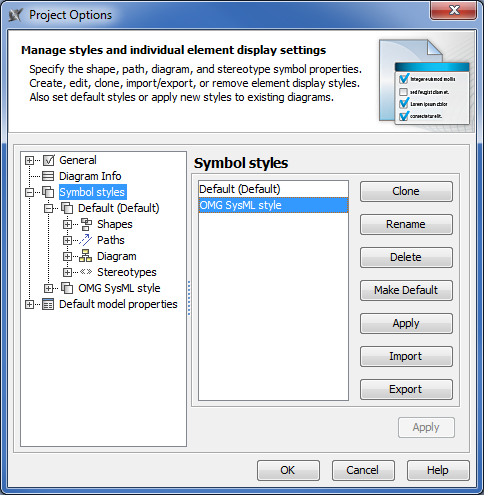
In the Project Options dialog, choose the Symbol styles on the left and select the OMG SysML style on the right.
If you do not see the OMG SysML style
a. Click the Import button. The Open dialog opens.
b. Open the <md.install.dir>/templates/SysML directory and select OMG SysML style.stl.
c. Click Open.
- Click the Make Default button.
- Click OK.
Your SysML project uses OMG SysML style as a default style.
To apply OMG SysML style to a SysML diagram
- In the main menu, select Options > Project.
In the Project Options dialog, choose the Symbol styles on the left and select the OMG SysML style on the right.
Click the Apply button.
In the Select Diagrams dialog, select a SysML diagram(s) and click OK.
Click OK in the Project Options dialog.
Applying OMG SysML style to existing SysML diagrams might distort the diagrams. Use the automated layout features that optimize diagram layout for viewing.