On this page
The Structure browser allows you to browse for deep nested structures of the structured classifier in your model. The node: diameter : mm represents the property: diameter : mm of the classifier: Wheel and also the property: w : Wheel is the property of the classifier: WheelAssembly, as shown in the image below: To open the Structure tab The property nodes, which are shown inside the property node (the parent property node), are the properties of the classifier that type the parent property node. In the Structure tab, you can open any selected element in a new tree. To open in a new tree There are two display options in the Structure tab: The classifiers of structure in your model is normally displayed in a Package, Model, or Profile hierarchy. Use the Display as Plain List option to show all classifiers of the structure in the model in the same level without consideration of their owner. When you select the Display in Plain List option, the classifiers are sorted by their name. To display elements in the Structure tree as plain list The Structure tab can show the properties that are inherited from the generalization classifier. To display inherited structures from the generalization classifier in the Structure tree The Structure Tab can also show requirements nested within elements that satisfy them. If the relationship is contextualized, its context is considered as well. Contextual Relationships To nest requirements under the satisfying elements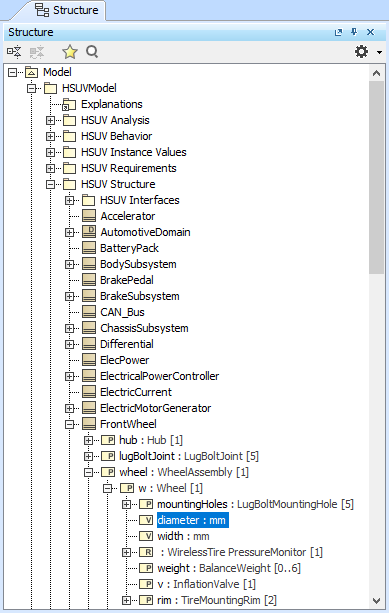
The Structure tab in the Model Browser.
Opening the Structure tab
Display as Plain List option
 on the right of the Structure Browser.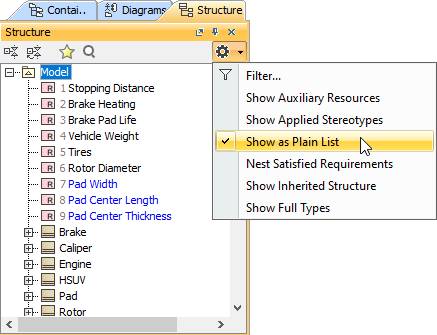
Displaying Inherited Structure option
on the right of the Structure Browser.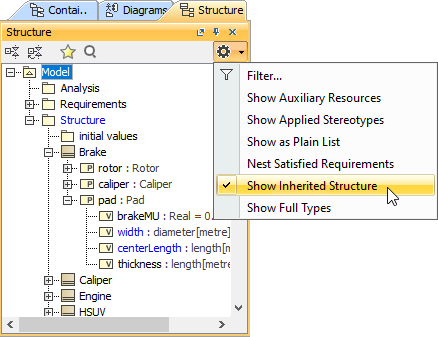
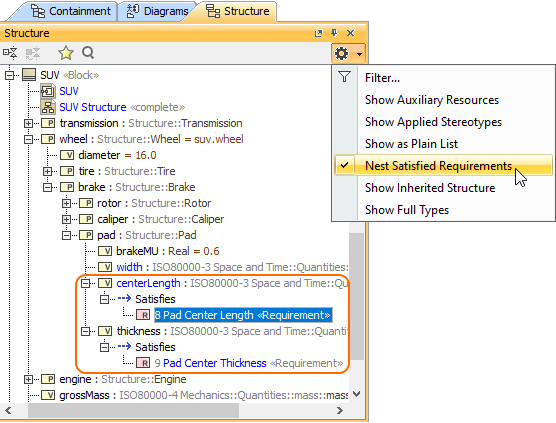
Nesting Satisfied Requirements option
on the right of the Structure Browser.