

On this page
Intoduction
You can export to Modelica file only parts, ports, and connectors displayed in theSysML Internal Block Diagram. The mechanism generates Modelica (.mo) file with an IBD name and save it to your file directory. See the following figure as example of export result and difference between whole (exporting Block) and partial (exporting IBD) model export. After the Circuit IBD export, only displayed parts are exported: Source, Resistor, Capacitor and Ground. Differently, when exporting the Circuit Block - all parts are exported: Source, Resistor, Capacitor, Inductor, Resistor and Ground. Modelica export
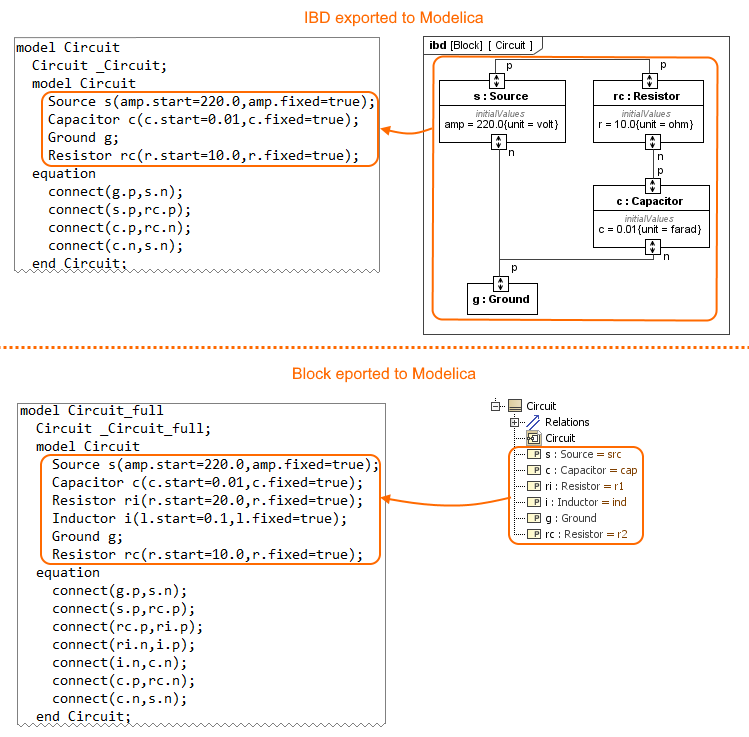
The difference between whole (exporting Block) and partial (exporting IBD) export.
Procedure of partial export to the Modelica file
You can use the SysML Internal Block Diagram to select what to export to Modelica. Prepare the IBD by modifying an existing or creating a new one and Displaying parts and ports automatically. Follow the procedure below, to export the Inetrnal Block Diagram to the *.mo file.
To export a part of model to the Modelica file
Create new or modify existing Internal Block Diagram by displaying elements you want to export.
Nested properties can also be exported. Nested properties export to the Modelica file
- Do one of the following:
- In the Model Browser, select the Internal Block Diagram and in the top-left corner of the modeling tool, click File > Export To > Modelica.
- Right-click an empty space on the Internal Block Diagram Understanding the user interface and click Tools > Export to Modelica.
- In the Model Browser, right-click the Internal Block Diagram and click Tools > Export to Modelica.
- In the Modelica Export Options dialog, specify export options. Option descriptions >>
- Click OK.
The Modelica (.mo) file is generated and saved to your file directory.