

The implied relation functionality allows you to analyze existing relations among parts in the Internal Block Diagrams. It let you know that parts are somehow related with each other without giving the detailed view of actual Connectors and ports. You can display implied relations between parts which are connected through ports/interfaces. By default, the implied relation is represented as a dashed line with a short summary in label of how many actual connectors are underneath. You can specify a different style of the implied relation by using its the Symbol Properties dialog.
The implied relation functionality allows you to:
- Display implied relations between Part Properties
- Display actual Connectors and ports from the implied relations level by level or all at once.
- Find actual Connectors in the Containment tree directly from the implied relation.
- Specify symbol properties of the implied relation.
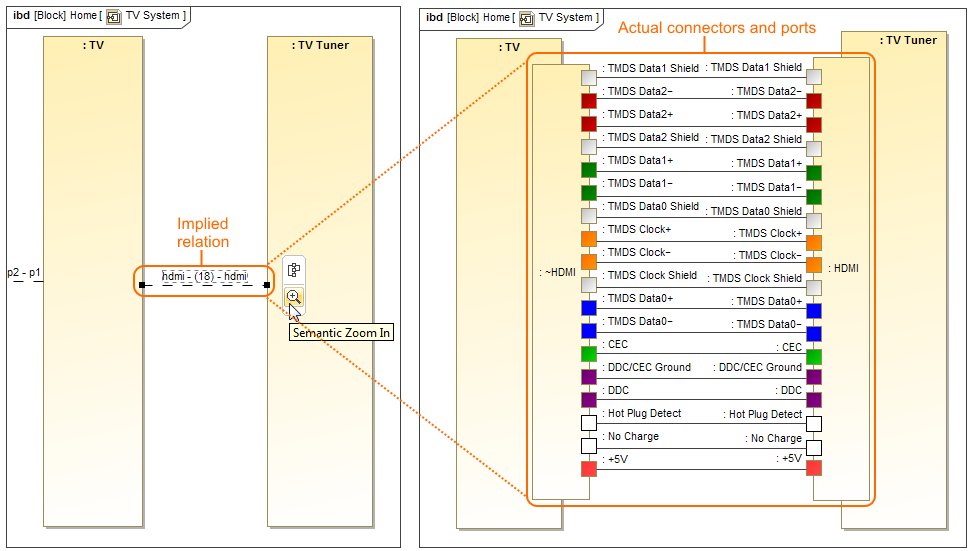
On the left side: the implied relation shows that 18 connectors exist between TV and TV Tuner parts. On the right side: all 18 actual connectors and ports are shown by using the Semantic Zoom In, or Display Underlying Connectors command.
How to work with implied Connectors read in the following pages:
- Displaying implied Connectors
- Displaying actual Connectors and ports
- Selecting actual Connectors in the Containment tree
- Changing the label display mode
Sample model
The sample model used in the figures on this page is the Implied Connectors sample model. Download Implied Connectors.mdzip.
Overview
Content Tools