

On this page
You can automatically create the SysML Parametric Diagram with elements from a mathematical equation by using the Parametric Equation Wizard. It parses the equation and creates a Constraint Block with named Constraint Parameters. The wizard analyzes underlying Block structures and finds matching Value Properties in nested structures.
Description of the Parametric Equation Wizard areas
The Parametric Equation Wizard consists of the following:
The Constraint expression box allows you to type or paste single or multiple mathematical equations which define the parameters you want to parse, create, and bind with properties (e.g. Value Properties, other Constraint Parameters, Part Properties). You can also modify the equation after clicking the Parse and Map button.
Editing constraint expression
- If you add new parameters to a preexisting equation, they are created after clicking the Parse and Map button.
- If you remove parameters from a preexisting equation, they remain in the mapping area after clicking the Parse and Map button.
The Contextual equation area shows the equation from the constraint expression box where parameter names are substituted with actual bindings. This area increases the readability of the parsed expression and allows you to evaluate binding correctness.
Parameter substitution rules
- If a parameter name already exists in the model and is connected (via Binding Connector) with another property (Value Property, Constraint Parameter, Part Property), the parameter is substituted with a property path (e.g. altitude is substituted with apollo.altitude).
- If a parameter is new, its name is shown as defined in the constraint expression box.
The Mapping area displays the bindings between parameters in the left tree and properties in the right tree. It allows you to review and change existing mapping by re-binding, creating new bindings, or deleting them. All Binding Connectors are shown in the binding area.
Binding map rules
Use the following rules to create an automatic binding map according to parameter name:
- Exact name matches have priority over partial name matches.
- Upper level properties have priority over deep nested value properties.
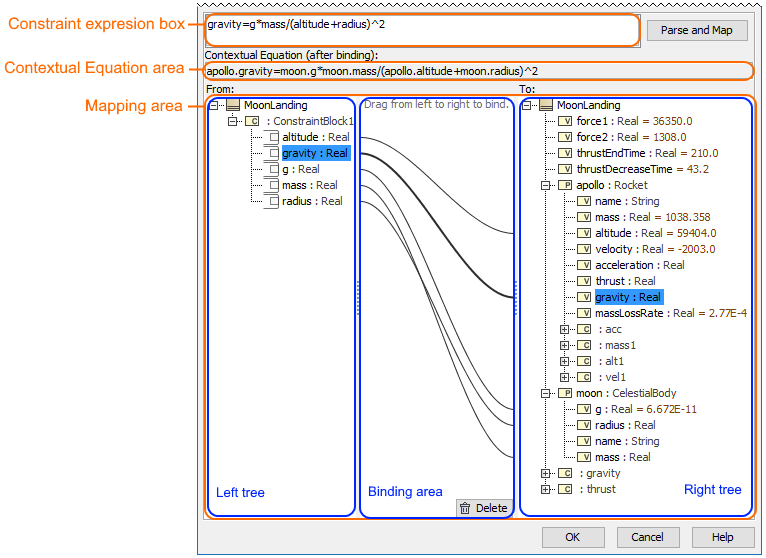
Three main areas (highlighted in orange) in the Parametric Equation Wizard: constraint expression, contextual equation, and mapping. The mapping area contains the left and right trees and binding area.
How to create a Parametric Diagram from an equation
To create a SysML Parametric Diagram from a mathematical equation
- Open the Parametric Equation Wizard using one of the following:
From the shortcut menu of the Block or Constraint Block, select Tools > Parametric Equation Wizard.

- In the SysML Parametric Diagram toolbar, click
 .
. - Open the SysML Parametric Diagram and press Ctrl+Alt+P.
- In the Containment tree, select Constraint Block and drag it on the SysML Parametric Diagram pane.
In the constraint expression box, type or paste single or multiple mathematical equations (see example below).
Click the Parse and Map button (see example below).
Information
If you modify the equation in the constraint expression box, use this button to refresh the data in the Contextual Equation and mapping areas.
(Optional) In the Contextual Equation area, evaluate the correctness of the parsed expression (see example below).
- (Optional) In the mapping area, review binding suggestions, and, if needed, do the following (see example below):
- Modify them by dragging Constraint Parameters in the left tree onto properties in the right tree.
- Delete them by selecting the Binding Connector and either:
- Click the Delete button at the bottom of the binding area;
- Press the Delete button in the keyboard. - Click OK (see example below).
The SysML Parametric Diagram with Constraint Block (default name ConstraintBlock), named Constraint Parameters, and properties connected via the Binding Connector, are created.
Example
The example below demonstrates the creation of the MoonLanding Parametric Diagram from the equation gravity=g*mass/(altitude+radius)^2. The new Constraint Block (default name ConstraintBlock) with five Constraint Parameters (names from equation: g, radius, mass, altitude, and gravity) are created and connected via Binding Connectors with Value Properties (match names with parameter names: g, radius, mass, altitude, and gravity).
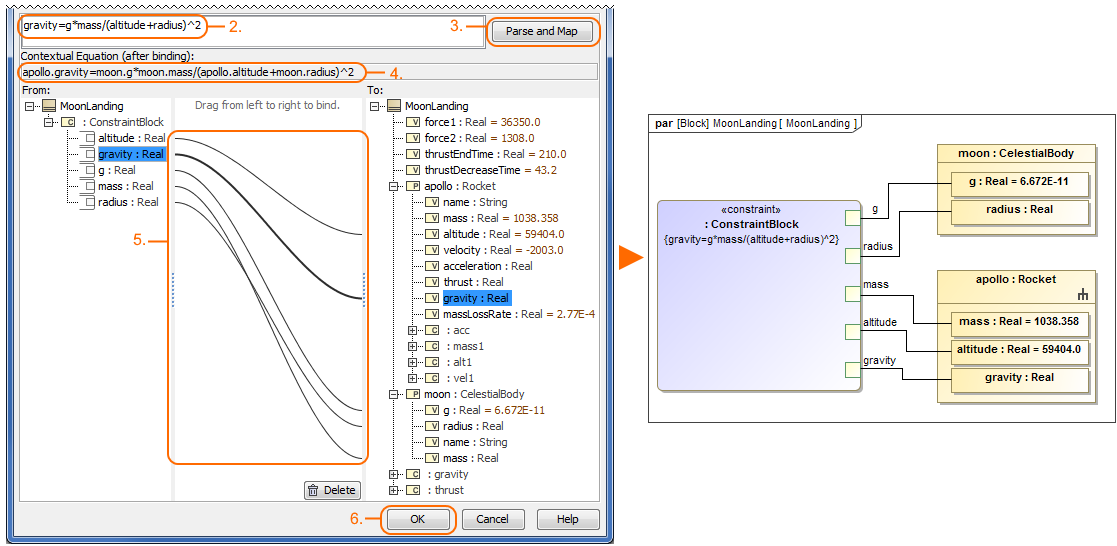
The main steps, highlighted in orange, in the Parametric Equation Wizard when creating the SysML Parametric Diagram from mathematical equation.
Sample model
The sample model used in the figures on this page is the Moon Landing sample model. Download MoonLanding.mdzip.
Overview
Content Tools