SysML Plugin TWRT Documentation


To create an alternative flow
- Open the Use Case Specification window and click the Use Case Scenario Sketch property group.
- Select the basic flow step you want to create an alternative flow for.
- In the Alternative Flow tab, click the Add new button
 . The shortcut menu opens.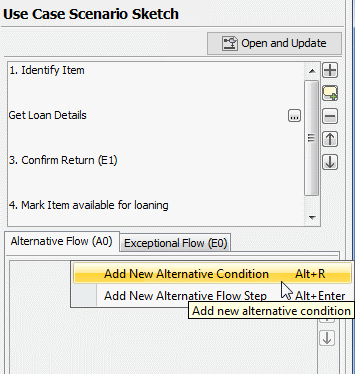
Do one of the following:
Select the Add New Alternative Condition command or press ALT+R to add a new alternative condition. A new alternative condition is created together with the alternative flow step. Type the name of the alternative condition. The alternative condition for the basic flow is created.
- Select the Add New Alternative Flow Step command. Press ALT+ENTER to add a new alternative flow step. If there was an alternative condition created in the alternative flow already, a new alternative flow step is created for the selected alternative condition. If in the alternative flow there was no alternative condition, a new alternative flow step is created together with a new alternative condition. Now you can type the name of the new alternative flow step.
Conditions and steps of the alternative flow are numbered automatically. Use the Up  and Down
  buttons to change the order of conditions in the alternative flow or the order of steps in a particular condition. In the Activity diagram, steps are represented according to their order in the Use Case scenario.
Overview
Content Tools