

You can move a resource (a project or a document) from one category to another by selecting a new category from the Category drop-down menu or dragging it to a category in the Categories list.
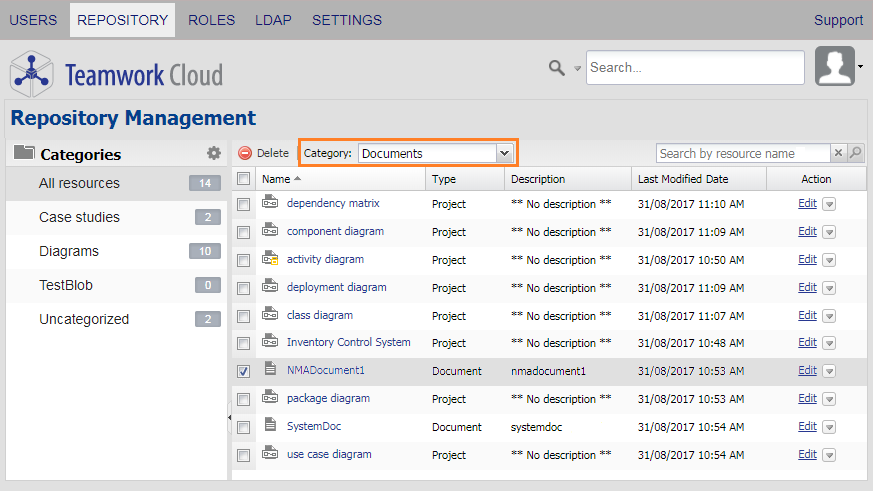
Moving a document from one category to another using the Category drop-down menu on the Repository Management page.
To move a resource from one category to another by using the Category drop-down menu
- Open the Repository Management page.
- Select a check box of a resource you want to move to another category.
- Click the Category drop-down menu button and select a new category for the resource.
- A confirmation dialog will appear. Either press Enter or click
 to move the resource to the selected category.
To move a resource from one category to another by dragging it
- On the Repository Management page, select a resource and drag it to a category name on the left-hand side.
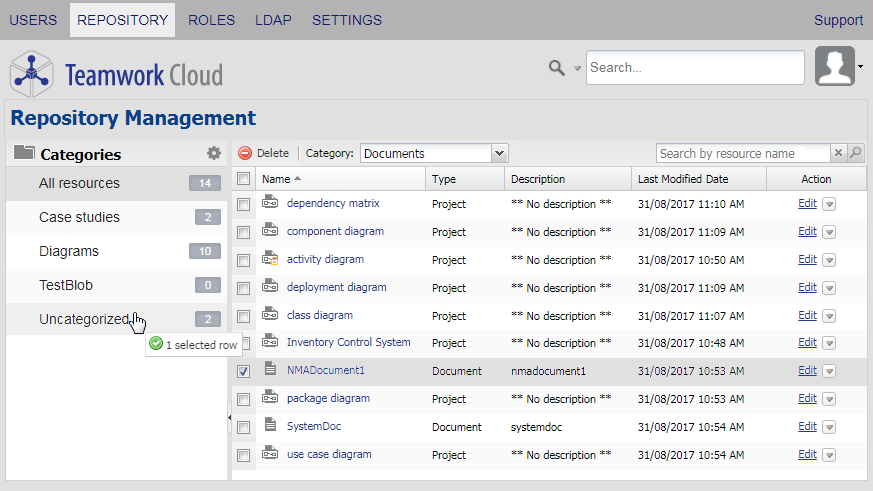
- Either press Enter or click to move the resource to the selected category.
Tips
- You can select several resources and drag them from one category to another at the same time.
- Alternatively, you can move a project or document to another category by clicking the name and selecting a new category from the Category drop-down menu on the Project detail or Document detail page, see section Editing resource name and description.