

Before creating CV-3 diagram, the CV-1 diagram with all necessary elements should be already created in the model. For this, click here. Otherwise, you can create those elements directly in the blank CV-3 chart. The following elements required for a smooth CV-3 diagram creation:
- Capability.
- Capability Provision.
Incremental Milestone.
End of Service Milestone.
The following procedures describe how to:
- Create CV-3 diagram by using the CV-3 Creation Wizard.
- Create an CV-3 diagram when CV-3 Creation Wizard is disabled.
- Fill in a blank CV-3 diagram.
Creating CV-3 diagram by using the CV-3 Creation Wizard
When you choose to create a new CV-3 diagram, CV-3 Creation Wizard opens automatically.
To create a CV-3 diagram from the wizard
- Right-click the CV-3 Package and select Create Diagram > CV-3 Capability Phasing.
- Follow the steps of the CV-3 Creation Wizard.
- Click Finish when you are done.
If you do not wish to use the CV-3 Creation Wizard next time, clear the Show the wizard next time, when I create CV-3 check box.
Creating an CV-3 diagram when CV-3 Creation Wizard is disabled
To create an CV-3 diagram manually when CV-3 Creation Wizard is disabled
- Right-click the CV-3 Package and select Create Diagram > CV-3 Capability Phasing.
Type the diagram name.
- Press Enter.
The blank CV-3 chart is created.
To restore the usage of the CV-3 Creation Wizard
- Select Options > Environment.
- In the Environment Options dialog select the UAF options group.
- In the General properties, set the Show CV-3/StV-3/NCV-3 Creation Wizard each Time Creating New Chart property value to true.
Filling in a blank CV-3 diagram
To fill in a blank CV-3 diagram
- Add a Capability in the following ways:
- To create new Capability, in the diagram toolbar, click the Add New button and select Capability.
- To add already existing Capability from the model, in the diagram toolbar, click the Add Existing button and select Capability.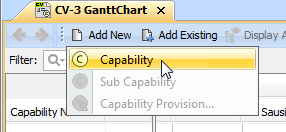
- Type the name of added Capability.
Related procedures