

To define Interface Block
- Create Interface Block in the model in one of the following way:
- From theSysML Block Definition Diagram Understanding the user interface, select the Interface Block button, and click the on the Understanding the user interface.
- In the Model Browser, right-click the Packagein which you want to store your interfaces, and select Create Element > Interface Block.
- Specify Flow Properties in one of the following way:
- Open the Specification window of Interface Block, select Properties group, click the Create button, and select Flow Property. Type its name, specify its direction, other properties, and click Close.
- In the Model Browser, right-click the Interface Block, and select Create Element > Flow Property. Type its name, specify its direction, or other properties.
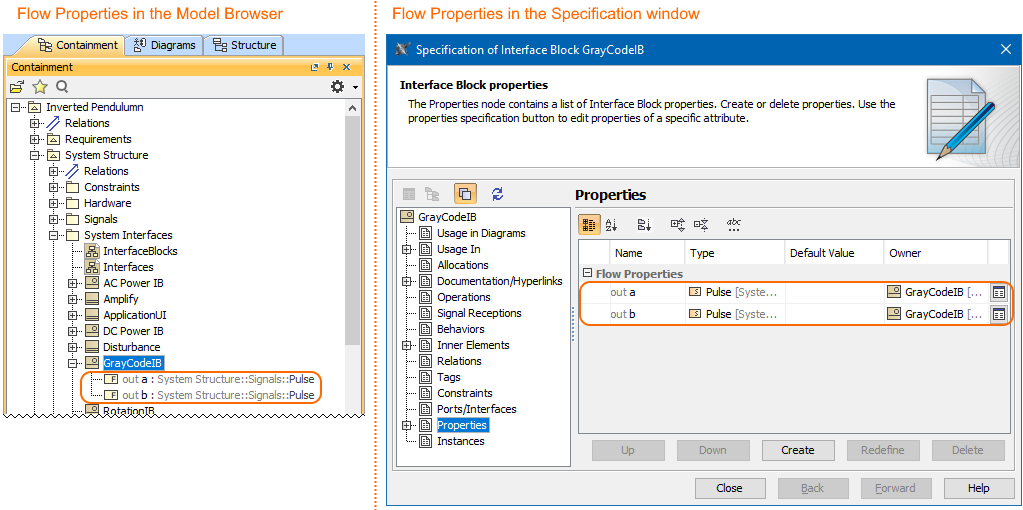
Defined Interface Block and specified its Flow Properties in the Model Browser and Specification window.
Sample model
The model used in the figure of this page is the InvertedPendulum sample model. To open this sample do one of the following:
- Download InvertedPendulum.mdzip.
- Find in modeling tool <modeling tool installation directory>\samples\SysML\Inverted Pendulum\Inverted Pendulum.mdzip.