

You can use the Alf editor to create an Alf Expression for the guard of a Transition in a State Machine or to edit an existing guard Expression.
To create an Alf guard Expression
- Select the Transition (in the Model Browser or as represented on a State Machine diagram) and open the Alf editor window (select Windows > Alf), if it isn't already open.
- In the Alf editor window, press Create. A menu will pop up with available options for creating a Transition effect Behavior or guard Expression.
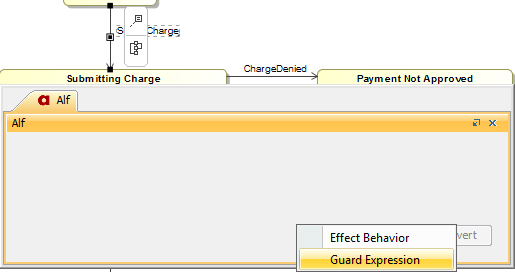
- Select Guard Expression.
Enter the Alf code for the Expression and press Save to compile and save it.
Note that the text entered must be an expression, not a statement. Therefore, it must not have a semicolon at the end.
The expression can access attribute values of the context Classifier of the Activity containing its Activity Edge (using Alf this expressions) or the decision input value for the Decision Node (see Accessing data in Activity Edge guards).
To edit an Alf guard Expression
- Open the Alf editor window (select Window > Alf), if it is not already open.
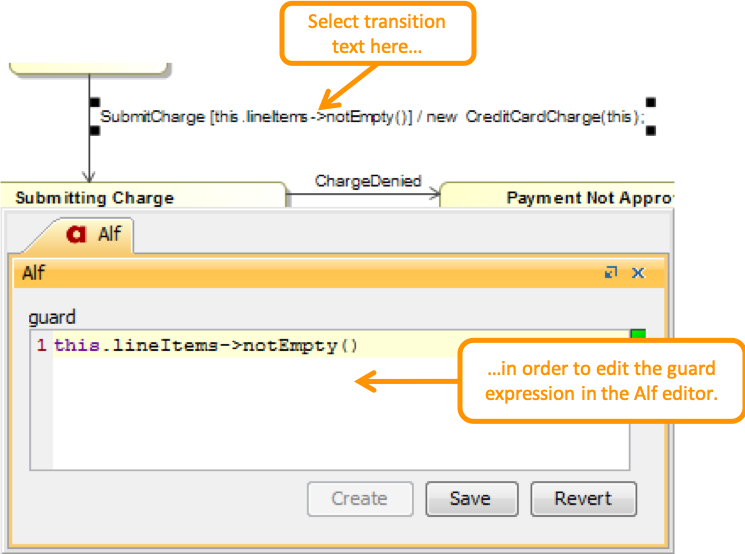
On the State Machine diagram, click on the text of the Transition trigger with the guard to be edited.
If a Transition has a guard Expression in Alf, but no effect Behavior, than selecting the Transition on a diagram results in the Alf code for the guard being displayed in the Alf editor window. However, if the Transition also has an effect Behavior in Alf, then selecting the Transition line on a diagram results in the Alf code for the Behavior being displayed in the Alf Editor. In order to edit the guard, select the text for the trigger of Transition.
- Enter the Alf code for the guard Expression and press Save to compile and save it.
The Alf code for a guard Expression can also be entered or edited directly in the Guard property in the Specification window of the Transition. If you open the Edit Guard window, then the Alf code can be edited just as in the Alf editor window. However, instead of Save and Revert buttons, this window has OK and Cancel buttons, either of which will close it. If you press OK, then the Alf text is saved, and, if it has no errors, compiled. If you press Cancel, the Alf text is not saved.
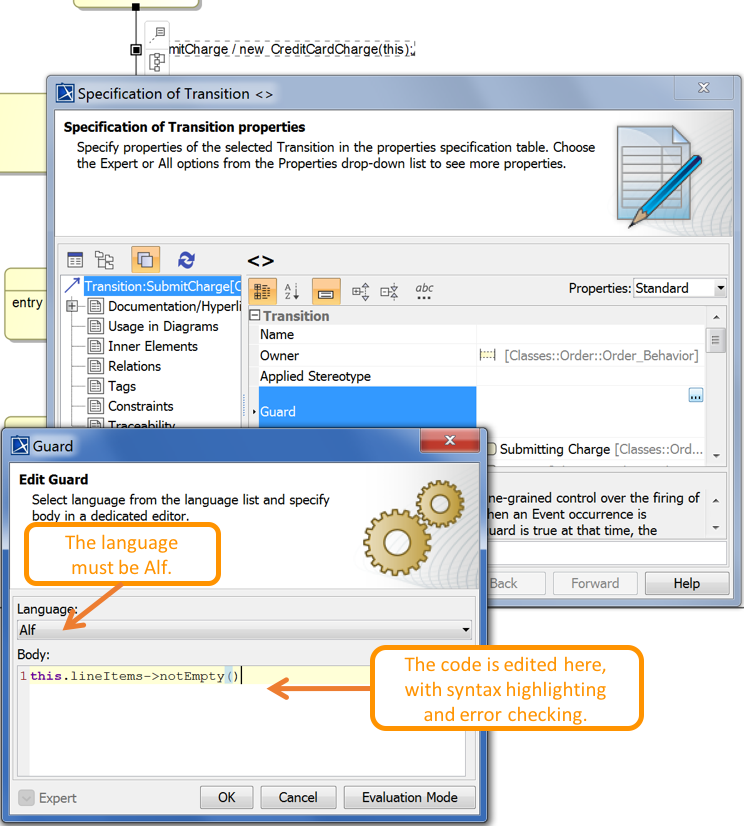
Editing code for a Transition guard Expression in the Edit Guard Window
To be recognized as Alf code, the Body of an Opaque Expression must have the Language Alf. If your project was created using the Alf project template, then Alf will be the default language. Otherwise, select Alf from the Language menu (you may have to scroll upwards in the menu to find the selection for Alf).
To make Alf the default language for Opaque Expressions
- Select Options > Environment.
- From the General options, select Editing.
- For the Opaque Expression Default Language option, type Alf (with exactly that spelling and capitalization). Click OK