This tab will appear in the Window menu only if the SysML plugin is installed.
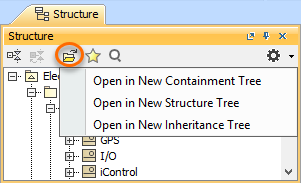
The Structure browser allows you to browse for deeply nested structures of the structured classifier in your model. The node: diameter : mm represents the property: diameter : mm of the classifier: Wheel and also the property: w : Wheel is the property of the classifier: WheelAssembly, as shown in the image below: To open the Structure tab The property nodes, which are shown inside the property node (the parent property node), are the properties of the classifier that type the parent property node. In the Structure tab, you can open any selected element in a new tree. To open a new tree The Structure tab can show the properties that are inherited from the generalization classifier. To display inherited structures from the generalization classifier in the Structure tree The Structure Tab can also show requirements nested within elements that satisfy them. If the relationship is contextualized, its context is considered as well. Learn more about contextual relationships >> To nest requirements under the satisfying elements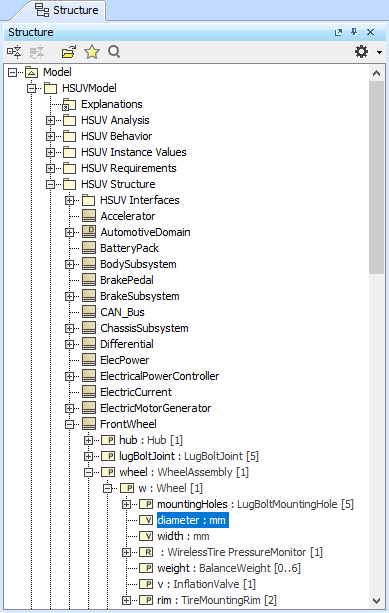
The Structure tab in the Model Browser.
Opening the Structure tab
 .
.Displaying Inherited Structure option
 on the right of the Structure Browser.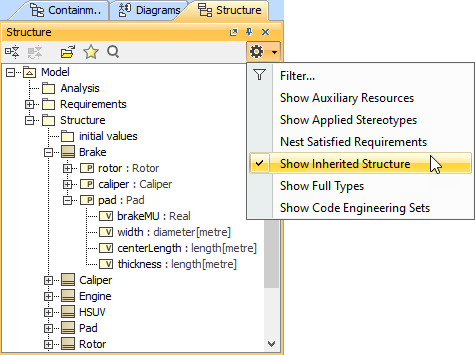
Nesting Satisfied Requirements option
on the right of the Structure Browser.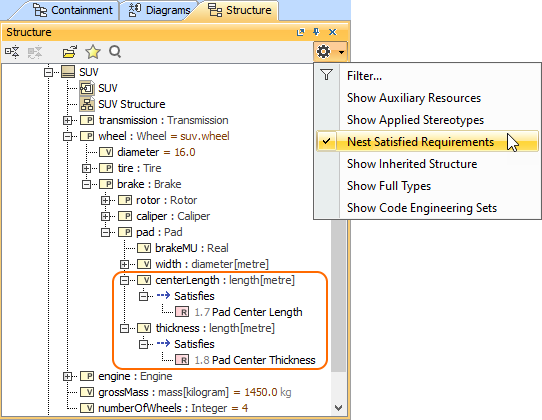
Structure tab toolbar
The Structure tab toolbar contains the following buttons:
Button | Tooltip text | Description |
| Collapse All | Collapses all of the currently expanded elements in the Containment tree. |
| Collapse Selected Recursively | Collapses only selected node and all subnodes in that node. |
| Open in New Tree | Opens the contents of the selected element in a new tab of the Model Browser. The selected element becomes the root node of the new tree. You can choose to open elements in:
|
| Favorites | Opens the Favorites menu for choosing to do one of the following:
|
| Quick Find | Opens the Quick Find dialog. |
| Options | Click to open the Options menu and then select:
|