Managing textual notation
The sections on this page provide the basic information for writing the textual notation using the Textual Editor.
Element declaration
An element is declared with (1) a keyword indicating the element kind, followed by (2) the element name, and then either (3) curly braces for specifying the element's body or a semicolon to indicate the end of the element's specification.
part flashlight; // keyword 'part', followed by the element name, and a semicolon, indicating the end of the element specification.
part 'LED Flashlight' { // opening curly braces for specifying the declared element's body
part bulb; // element's body
} // closing curly braces indicating the end of the element specification.
part; // declared element without a name
Keywords
- Keywords indicate element kind (part def, part, flow, item, etc.), relationships (subsets, specializes, redefines), or additional properties, such as directions (in, out, to, from, etc.).
- Keywords are always typed in lowercase.
- Special textual symbols may replace specialization keywords. See the subpages under the Specializations page.
By default, keywords are indicated in #1D0FFF color, differentiating them from other notational text.
- Multiple keywords may be specified in a defined order: (1) modifiers (direction, derived, abstract, constant, ref), (2) individual, (3) portion kind (snapshot, timeslice), (4) metadata, (5) element metaclass, (6) element name, (7) multiplicity, (8) specialization.
individual timeslice part myCar defined by Car; // individual, portion kind (timeslice), element metaclass (part), element name (myCar), specialization (defined by Car).
For all element keyword examples, see the Model composition section.
Naming
- Unrestricted element names that include whitespace, special characters, or that correspond to keywords, must be encapsulated with single quotation marks.
- Press the quotation mark (or Shift+quotation mark) key to encapsulate a text selection with single or double quotation marks.
Basic element names without special characters or whitespace do not have to be encapsulated.
For more information, see the Element names page.part 'LED Flashlight' { // unrestricted element name that includes whitespace
part bulb; // basic element name without whitespace
}
Name resolution
Name resolution allows you to target an element by its name, which can be done in the following ways:
- Feature chaining
- A feature chain allows you to target a specific usage element located within the scope of another usage element, as long as the targeting and the target elements are within the scope of the same parent element.
- A feature chain can only chain usage elements.
- A feature chain is specified as a sequence of two or more usage element names separated by dot symbols.

- Qualified name
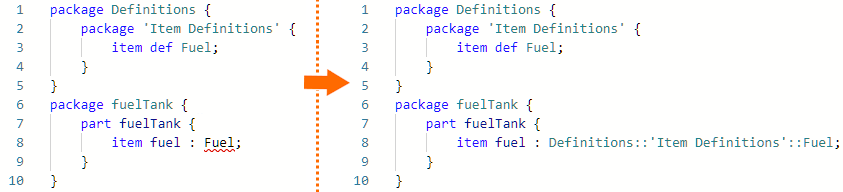
- A qualified name identifies an element qualified by the namespace relative to which the element name is to be resolved.
- A qualified name can be used to target any element (definitions, usages, packages).
- A qualified name is specified as a sequence of segments that indicate namespaces, which are separated by the :: symbol.
Textual notation errors
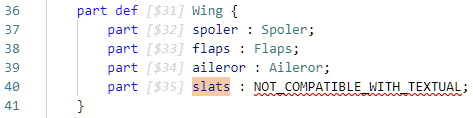
If a portion of the textual notation is incompatible or cannot be rendered, error messages may appear in place of the invalid content. Although rare, this may occur when importing a non-compliant model.