SysML Plugin TWRT Documentation


When modeling deeply nested structures, you can display nested properties within a system hierarchy in the SysML Internal Block Diagram and SysML Parametric Diagram. You can represent nested properties by displaying the property shape inside another property shape. For example, on the left side of the figure below, the wheel, brake, and caliper are nested parts represented as nested Part Property shapes. Representing deeply nested properties in this manner requires a lot of space in the diagram.
Alternatively, you can represent nested properties by using dot notation, which expresses a structural hierarchy compactly in the form of a text string. Dot notation references a nested property accessible through a sequence of intermediate properties from a referencing context. The name of the referenced property is built by a string of names separated by “.”, resulting in a path name that identifies the property in its local context. This notation is purely a notational shorthand for a property that could otherwise be shown within a structure of nested property shapes. For example, on the right side of the figure below, the nested parts are represented using dot notation with the higher-level part names (vehicle, wheel, and brake).
The meaning of both of them is the same: caliper is a part of brake which is a part of wheel; wheel is a part of vehicle.
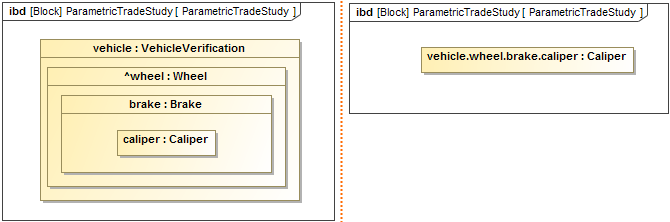 Two alternative ways to represent nested parts in the SysML Internal Block Diagram.
Additional information
The representation of nested properties with dot notation form is used on Lifelines and in Instance Table column headers.
When working with nested properties, manage them as follows:
Displaying type names in a property path
The dot notation separates the property names. However, there are many situations when properties are unnamed (see the right side of the figure below).
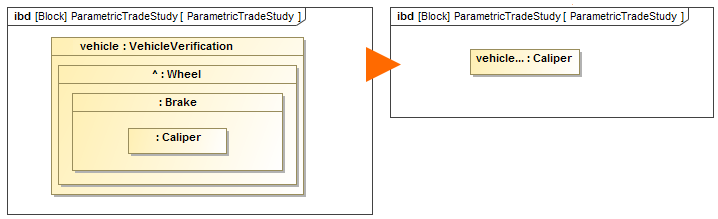
The representation of a property path with dot notation of nested parts when they are unnamed.
If you use an earlier version than 18.5, you must set the option which shows type names in a property path with dot notation. For a new project, this option is enabled by default.
To show type names in the property path
- Select Options > Project.
- In the Project Options dialog, set the Show Type Names in Nested Path option to true.
The type names of the nested parts are shown in the property path by separating them with a colon (:).
For example, after enabling the Show Type Names in Nested Path option, the part with dot notation, on the right side of the figure, provides information about nested part types.

The property type names are shown in the property path with dot notation.
Converting nested properties to dot notation
You can convert nested properties from the system structure to dot notation form.
To convert nested properties to dot notation form
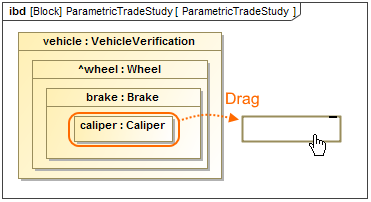
- Select the nested property shape from the property shape structure, drag it to the empty space on the diagram pane, and in the Question dialog, click the Represent as Shortcut button.
- Open the Display Parts/Ports dialog or Display Parameters/Properties dialog, select an appropriate deep nested property in the element tree, and click OK.
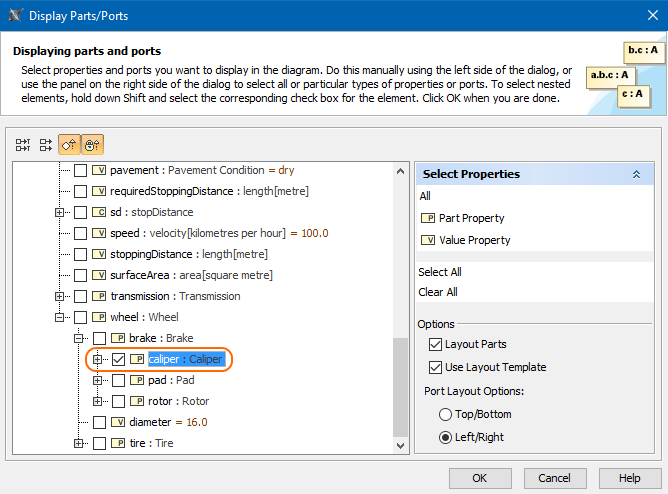
The nested property is displayed in dot notation form.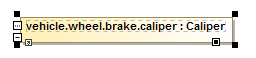
Converting properties with dot notation to a structure of nested properties
You can convert a property shape displayed with dot notation form to a nested properties structure.
To convert properties with dot notation form to a nested properties structure
- From the property shortcut menu, select Refactor > Convert to Nested Parts.
The property with dot notation is converted to a structure of nested properties.
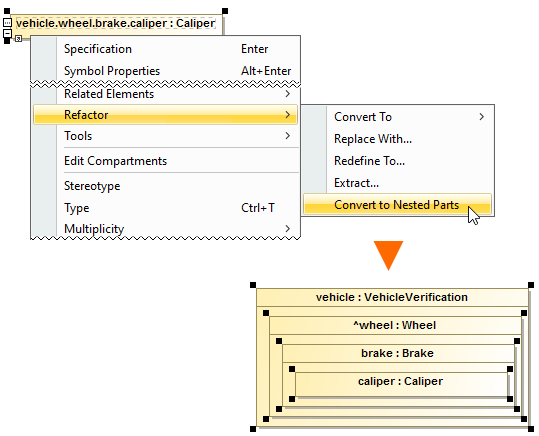
The part caliper represented with dot notation is converted to a nested structure of Part Properties.
Moving a part from the diagram to a structure compartment
You can move a property shape with dot notation from the diagram back to the compartments of a nested property.
To move a property with dot notation to the compartments of a nested property
- Select the property shape with dot notation.
- Drag it to the structure compartments.
The property is moved to the structure compartments and shown in dot notation form.
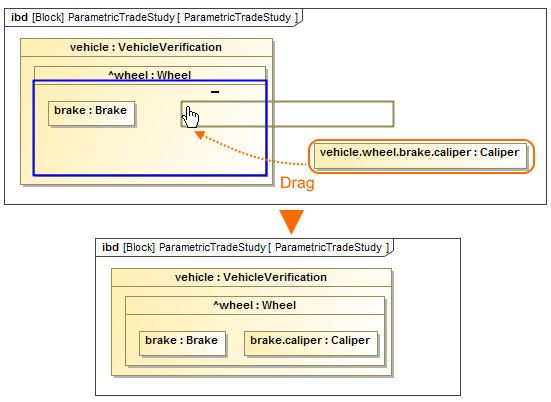
The part caliper is moved back to the nested property compartments.
Related pages
- SysML Internal Block Diagram
- SysML Parametric Diagram
- Displaying parts and ports
- Displaying parameters and properties
- Connecting parts through interface
- Part Property
- Reference Property
- Value Property
- Constraint Property
- Constraint Parameter
- Flow Property
- Participant Property
- Bound Reference
- Distributed Property
Sample model
The model used in the figures of this page is the Car Braking Analysis sample model. Download CarBrakingAnalysis.mdzip.
Overview
Content Tools