

You can use the Alf editor to create an Alf body for a new Activity or to edit the existing Alf body of an Activity. Compiling the Alf body of an Activity results in the generation of Activity Nodes and Activity Edges within the Activity. Executing the Activity then has the behavior specified by the original Alf code. The Alf code itself is stored in a Comment owned by the Activity, which has the TextualRepresentation stereotype applied. Normally, you should not modify any of the contents of an Activity with an Alf body, other than by editing its Alf code using the Alf editor. (See also the discussion on the Alf compiler.)
To create an Activity with an Alf body
- Create an Activity in the Model Browser, but do not create an Activity diagram.
Add Parameters to the Activity as desired.
The easiest way to create an Activity with Parameters is to type the complete signature for the Activity with its name when you create it. For example, if you type Compute(x: Integer): Integer for the Activity name, this results in an Activity named "Compute" with an Integer input parameter named x and a return type of Integer. Parameter declarations may also be prefixed with in, out or inout to specify the Parameter direction.
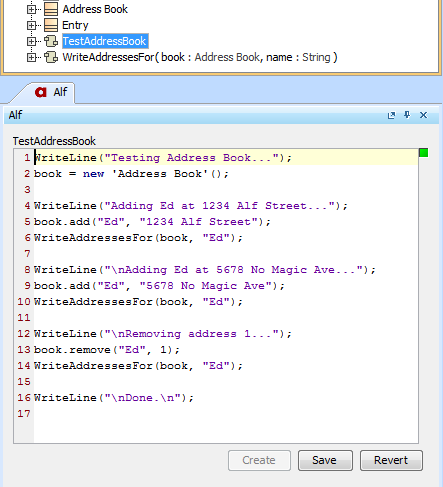
Select the new Activity in the Model Browser and open the Alf editor window (select Windows > Alf), if it isn't already open.
Enter the Alf code for the Activity and press Save to compile and save the code.
To edit an existing Alf body for an Activity
- Select the Activity in the Model Browser and open the Alf editor window (select Windows > Alf), if it isn't already open. The existing Alf code will be displayed in the window.
If an Activity has been defined using an Activity diagram, then it is not possible to enter Alf code for it. If you want to re-define an existing Activity using Alf, then, first, open the Activity diagram and delete all Activity Nodes on it other than Activity Parameter Nodes. Then you can proceed to enter Alf code for it as above.