

On this page
Introduction
You can decompose Blockby defining their specific features with properties. Block properties are used to capture the structural relationships and values of a Block. After the Defining Blocks in Block Definition Diagram, you can decompose each Block into:
- Structural properties:
- Behavioral properties:
In the figure below, you can see the Computer Block decomposed into four Part Property and three Proxy Port. This decomposition can be shown directly in BlockSysML specific compartments(highlighted in blue), or can be represented in the SysML Internal Block Diagram (highlighted in orange).
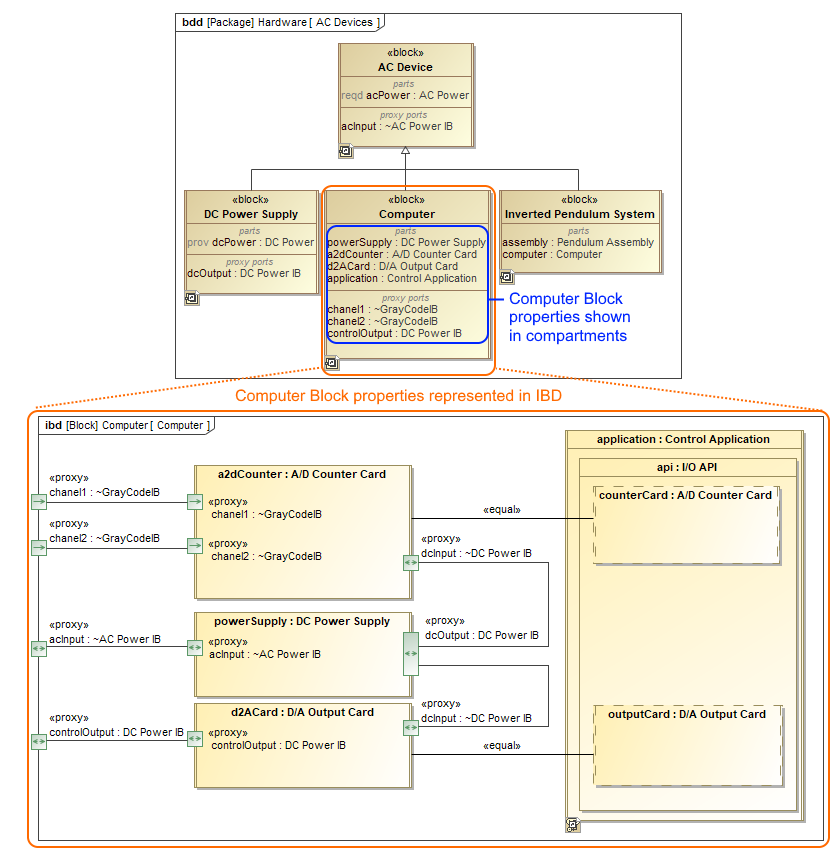
The Computer Block decomposition and its representation in SysML Internal Block Diagram.
Creating and managing Block properties
You can create and manage Blockproperties by using Smart manipulators or Specification window. Creating and managing Block properties
Creating SysML Internal Block Diagram
The Blockproperties are represented in the SysML Internal Block Diagram. You can create this diagram directly for the selected Block shape. Creating SysML Internal Block diagram for a Block
If selected Block already has properties, the opened Displaying parts and ports allows you to select which of properties you want to represent.
The SysML Internal Block Diagram can also be created in many other ways as described in the Creating diagrams page.
Representing Block Properties in SysML Internal Block Diagram
You can represent Block properties in the SysML Internal Block Diagram in by using the Display Parts/Ports dialog, diagram toolbar, the shortcut menu, smart manipulator, drag-and-drop operation. All of those ways are described in the Displaying parts and ports page.
If you displayed nested properties, you can select their representation way. You can represent nested properties by displaying the property shape inside another property shape or by using dot notation. The detailed procedures how to work with property path notation, read in the Property path notation page.
If properties have their own SysML Internal Block Diagram, you can represent their internal structures inside shapes. Displaying internal structures on structured classifiers
Selecting property types
The structural Blockproperties must have a type that may be another Block or another concept such as integer value. Selecting property type
Related pages
- Creating and managing Block properties
- Creating SysML Internal Block diagram for a Block
- Selecting property type
- Displaying parts and ports
- Displaying internal structures on structured classifiers
- Property path notation
- SysML Internal Block Diagram context
- Creating nested parts by pasting items from the list
Sample model
The model used in the figure of this page is the InvertedPendulum sample model. To open this sample do one of the following:
- Download InvertedPendulum.mdzip.
- Find in modeling tool <modeling tool installation directory>\samples\SysML\Inverted Pendulum\Inverted Pendulum.mdzip.