

Behavior Creation Mode
You can use the Behavior Creation Mode to automatically create an Activity after creating a Call Behavior Action in the Activity Diagram. The newly created Activity will be set as the behavior of the Call Behavior Action.
To turn on the Behavior Creation Mode in an Activity diagram
In the diagram palette, click
 .
.The Behavior Creation Mode works separately for each project.
When the Behavior Creation Mode is on:
- A Behavior is created together with the Call Behavior Action. It inherits the type of the Call Behavior Action owner.
- If a Call Behavior Action and its Behavior are not titled, type a name on the Call Behavior Action shape on the diagram, and the typed name will be set as the Behavior's name automatically.
Creating Actions by pasting the copied list
You can copy the item list from the text editor (Word, Notepad, etc.), web page, PDF file, PowerPoint slide and paste it in the Activity diagram to create actions.
To create Actions by pasting items from the list
- Copy the list.
- Go to the diagram and press Ctrl+V.
- Select an Action.
- In the question dialog click Yes if you need to connect the Actions with Control Flow relationship.

Smart layout
Dynamic centerlines
The centerlines are displayed only when the center of the shape that was moved or newly drawn is located near the center of a preexisting shape in the diagram. These lines help you to easily align shapes when drawing a diagram.
When the center of the shape that was moved coincides with a center of any shape that is placed to its right or left, a horizontal centerline appears. When the center of the shape is close to any center of a shape that is located above or below it, a vertical centerline appears.
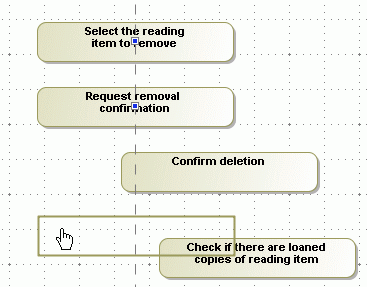
To switch off the dynamic centerlines
- Click the Show Centerlines button
 in the diagram toolbar, or press C.
 - From the Options main menu, select Environment. In the Environment Options dialog, click the Diagram category, and clear the Show Centerlines in Flow Diagrams check box in the Display properties group.
Diagram orientation
The diagram orientation is used to assign the correct rectilinear path breaks and draw paths between the Activity diagram shapes. The paths can be drawn from side to side, or from the lower to the upper shape borders.
Example
If you have a vertical diagram orientation and shapes are not in the same centerline, the paths will be connected from the lower border of the first shape to the upper border of the next shape, adding break points: 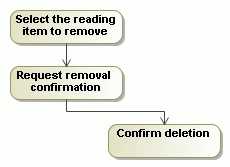
If you have a horizontal diagram orientation, the paths will be connected from the side border of the first shape to the next side border of the second shape, adding breakpoints: 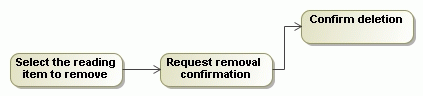
- From the Options main menu, select Project. In the Project Options dialog, expand Symbol Styles > Default > Diagram group (if it is not expanded by default) and, in the options list, change the value for the Diagram Orientation property.
- From the diagram pane shortcut menu, select Diagram Properties, or press Shift+Enter to open the Diagram Properties dialog. Change the value for the Diagram Orientation property in that dialog.
Deleting from Activity diagrams
- Note that after deleting the last symbol of an element from the Activity diagram, the element will be automatically removed from the model. This does not affect Pins and Activity Parameter Nodes.
If a Call Behavior Action that has an assigned Behavior is deleted from the Activity diagram, then this Behavior is also deleted from the model.
This is valid if the assigned Behavior is editable and does not have more usages, i.e. there is not a Call Behavior Action that has a reference to this Behavior.
Displaying inner elements
To display inner elements
- When creating a new Activity diagram, right-click an Activity in the Containment tree, click Create Diagram, and then click Activity Diagram.
Inner elements are displayed on the Activity diagram pane automatically upon creating the first diagram under the Activity element.
- From the shortcut menu, click Display > Display Inner Elements.
- On the diagram toolbar click  , and select Display Inner Elements.
Overview
Content Tools