Key concepts
This page provides descriptions of basic concepts related to the SysML v2 elements that are relevant to know before you begin modeling.

For a comprehensive list and examples of SysML v2 elements, see the Model composition section.
The general structure of the model is comprised of the global namespace, which encloses one or more namespaces that contain model elements optionally organized into packages.
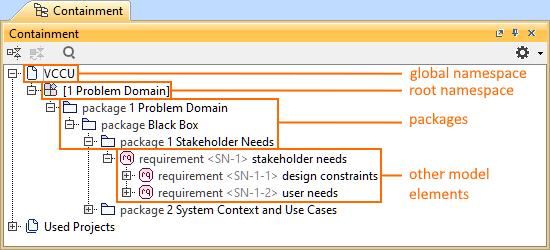 Model organization.
Key concepts
Below is a list of some of the SysML v2 elements key concepts, along with expanded descriptions following.
- Namespace
- Elements and relationships
- Elements
- Relationships
- Definition and Usage
- Specialization relationships
- Definition specialization: subclassification
- Usage specializations: feature typing, subsetting, reference subsetting, redefinition
Namespace
A namespace is a kind of element that can contain other elements and assign names to them. The contained elements are referred to as member elements, which are related to a namespace via a membership relationship. It can specify both the name by which the member element is known within the containing namespace and whether the visibility of the element's membership extends beyond the namespace.
Kinds of namespaces:
- Global namespace
- Root namespaces
- Packages
- All definition and usage elements
Global namespace
A global namespace acts as a container for all root namespaces within a single project, including all SysML model libraries. There is no syntax for the global namespace, thus it is not represented in graphical or textual notation. In the modeling tool, the global namespace is represented by the top-level <project_name> package. Elements within any root namespace can refer to top-level elements of any other root namespace without qualification, as root namespaces themselves are not named. The global namespace essentially encapsulates all root namespaces and their elements, providing a mechanism for cross-reference among them.
Root namespace
A root namespace is defined as a namespace without an owner. It contains top-level elements, and every element that is not a root namespace must belong to an ownership tree of a top-level element in some root namespace. The declaration of a root namespace is implicit within SysML, and its content is represented by its top-level elements. Root namespaces are sorted by creation date. The root namespace is automatically named after the initial package created for it and cannot be renamed. For a procedure on root namespace creation, see the Managing elements page.
Package
A package is a specific type of namespace designed for organizing and grouping elements within a model. It serves as a container that can include both structural and behavioral elements, facilitating modular design and reuse. Packages can be used to structure the model in a hierarchical manner, enabling better organization and management of model elements. This approach allows the logical grouping of related elements, improving the clarity and maintainability of the system model. In the modeling tool, a package element can only be created for a root namespace within the Containment tree or via Textual Editor. For procedures on package management, see the Package page.
Elements and relationships
The following concepts apply to all model elements.
Elements
- Every model element is assigned an element ID, which remains unchanged from the element's creation until its deletion, even if the element properties change.
- Every model element may have one or more alias IDs relative to one or more namespaces.
Relationships
- A relationship is a kind of element that relates two or more model elements.
- Relationships can be:
- Binary - relating exactly two elements.
- Non-binary - relating more than two elements.
- Directed - a relationship that is directed from source to target.
- Undirected - a relationship within which all elements are targets without any source elements.
- A relationship may also serve as the source or target of other relationships.
- There are several kinds of relationships:
- Specializations: Subclassification, Feature typing, Subsetting, Reference subsetting, Redefinition
- Connectors: Connection, Interface, Flow, Succession, Succession flow, Binding, Allocation, Derivation
- Other relationships: Annotation, Dependency, Feature membership
Definition and Usage
In SysML v2, definition and usage are the primary constructs facilitating reusability for different kinds of elements (requirements, use cases, interfaces, ports, attributes, etc.).
Definition
A Definition element classifies the element kind (requirement, use case, etc.). In the modeling tool's graphical notation, definitions are always represented as rectangles. 
In the modeling tool's Textual Editor, a definition is represented by the keyword def.
part def Vehicle;
Usage
A Usage element is a usage of a definition element within a specific context. A usage must be defined/typed by at least one definition that corresponds in kind (requirement usage defined/typed by requirement definition). If the usage is undefined by the user, it is implicitly defined by the appropriate kind defined in the Systems Library. In the modeling tool's graphical notation, usages are always represented as rectangles with rounded corners. 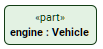
In the modeling tool's Textual Editor, usage has no keyword. It is represented simply by typing the element kind (e.g., requirement, use case, etc.).
part engine : Vehicle;
Features
A definition can own usage elements, which are referred to as its features. A usage can also own other usage elements as features.
Graphical compartment and body
An element may contain other elements, which can be represented in the:
- Graphical compartments (graphical notation). The graphical compartment(s) is displayed in the owning element's symbol.
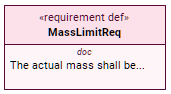
Body (textual notation). The body is bound by curly braces, e.g., {...}.
requirement def MassLimitReq {
doc /* The actual mass shall be...*/
}
Specialization relationships
SysML v2 provides specialization relationships used to specialize definition and usage elements. Specialization lets modelers build specific elements by inheriting features from more general ones. They can then tailor or adjust these features to fit different situations. Below is a list of various types of specialization relationships:
Subclassification: used to specialize a definition element. See the Subclassification page to learn more.
Feature typing: specifies a definition for a usage. See the Feature typing page to learn more.
Subsetting: used to specialize a usage element. Inherited features can be subsetted by multiple features. See the Subsetting page to learn more.
Reference subsetting: is a kind of subsetting relationship. While a subsetting usage can have multiple subsetted usages, a reference subsetting usage can only have one specific subsetted usage. See the Reference subsetting page to learn more.
Redefinition: is a kind of subsetting used to replace an inherited feature by redefining. See the Redefinition page to learn more.